
The Email Countdown Timer With Built-in Urgency
A countdown without urgency is just a clock. Attach animated, time-triggered messages to your email countdown timer that speak up the moment it matters — driving clicks and conversions as time runs out.
What Are Urgency Messages?
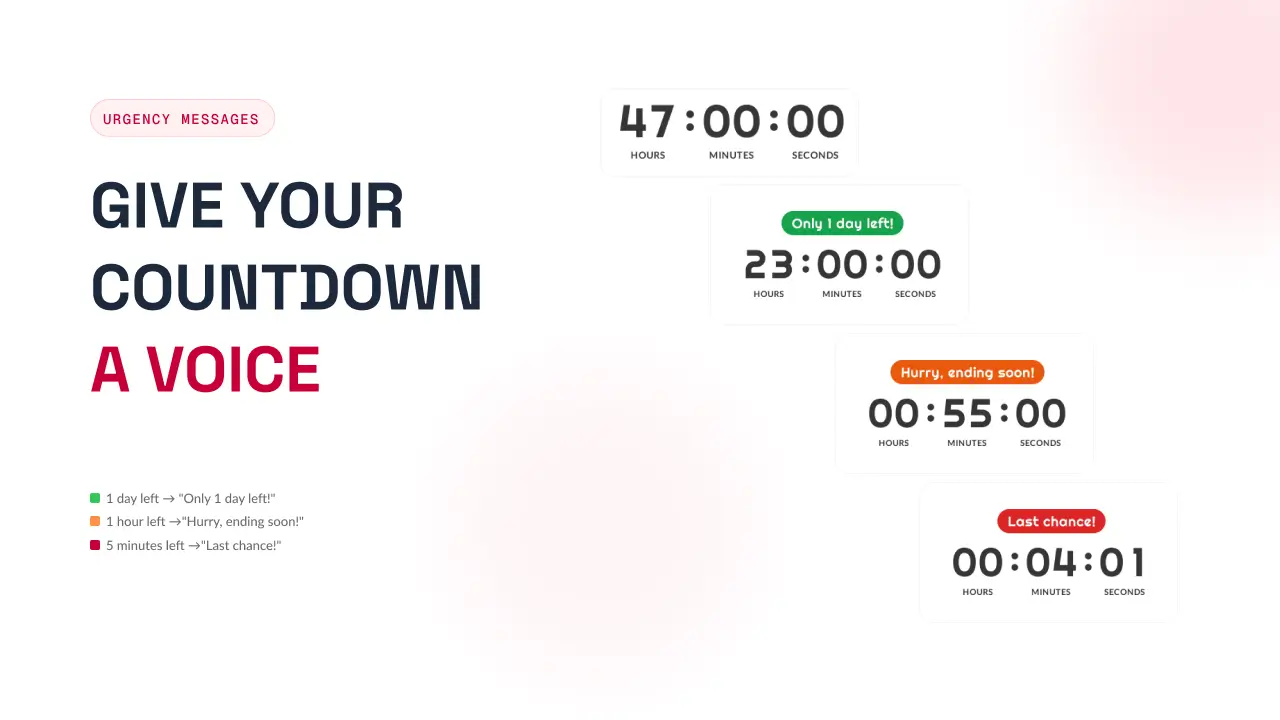
Urgency messages are short, animated lines attached to your email countdown timer that activate as time runs out. When one day remains, it says "Only 1 day left!". When an hour is left, "Hurry, ending soon!". When seconds tick away, "Last chance!".
Each message appears above or below your timer with its own color, font, and style — designed to grab attention at the exact moment it matters most.
- Emotional pressure. Urgency messages turn "I'll come back to this" into "I need to act now" — the kind of pressure that turns browsers into buyers.
- Color triggers response. Green for awareness, orange for hurry, red for act now — color psychology matched to the weight of the moment.
- Placement matters. Above the timer to interrupt, below to reinforce. Both are impossible to ignore.
People see a countdown and think "I'll come back to this." Urgency messages change that — they make the email countdown timer feel personal, immediate, and unmissable.
A Built-in Escalation Ladder
The moment you enable urgency, three ready-to-use triggers are pre-configured. Tweak the text, swap the colors, or add your own.
| Trigger | Message | Color | Emotion |
|---|---|---|---|
| 1 day remaining | Only 1 day left! | Green | Awareness |
| 1 hour remaining | Hurry, ending soon! | Orange | Urgency |
| 5 minutes remaining | Last chance! | Red | Action |
Stack as many thresholds as you need. The countdown automatically shows the most relevant message — the one closest to zero — so you never show "1 day left" when there are only five minutes to go.
More Than a Clock
Scarcity That Sells
"Only 1 day left" feels different from "42 days left" — even when both are true. Urgency messages make the remaining time feel personal and immediate.
Color Psychology
Green says go, orange says hurry, red says act now. Each message carries its own color, so the emotion lands before the words are even read.
Above or Below
Place messages above the timer to interrupt and grab attention, or below to reinforce and nudge. Either way, they are impossible to ignore.
Escalates Automatically
Stack as many thresholds as you like. The countdown always shows the most relevant message — the one closest to zero. Never a stale one.
Perfect For
Flash sales
4 hours → "Sale ends soon!" / 30 min → "Final hours!" / 5 min → "Going, going, gone!" Escalating pressure drives immediate purchases.
Event registration
1 week → "Don't miss out" / 1 day → "Last chance to register" / 1 hour → "Doors closing". Reduces no-shows and last-minute drop-offs.
Product launches
7 days → "Coming soon" / 1 day → "Tomorrow!" / 1 hour → "Launching in 60 min". Builds anticipation and converts browsers.
Free-trial reminders
3 days → "Trial ending" / 1 day → "Last day" / 1 hour → "Almost gone". Reduces silent churn before renewal.
How It Works
Four small decisions turn a plain timer into a message that converts.
Set your triggers
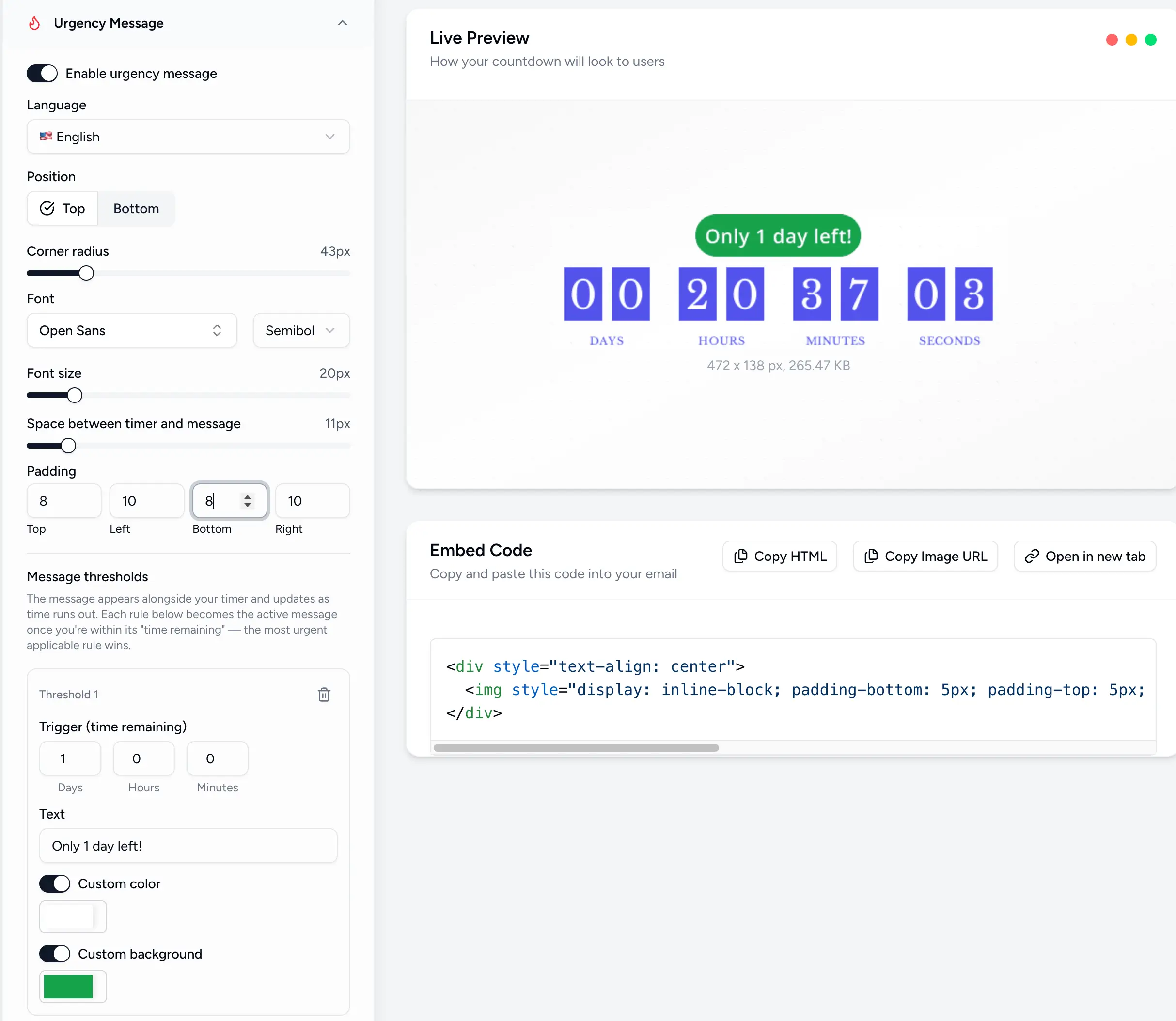
Define the moment each message appears — the time remaining, the text, the text color, and a background color.
Customize the look
Pick a font and size, corner radius, and padding for each message — or let it inherit the timer font.
Position it
Place messages above the timer to interrupt, or below to reinforce. Choose what fits each campaign.
Stack & escalate
Add multiple thresholds. The countdown shows the one closest to zero — you will never see "1 day left" with 5 minutes to go.
Powerful, Fully Customizable
Make Every Second Count
Match colors to emotions
Green for awareness, orange for urgency, red for action. Your audience reads the color before they read the text.
Keep messages short
"Last chance!" beats "You have reached the final moments of this opportunity." Brevity is impact.
Two to four triggers
The sweet spot. Too many messages feel spammy; too few miss the escalation that drives action.
Test above vs. below
Above interrupts — great for short flash sales. Below reinforces — better for longer campaigns.
Simple 3-Step Setup
Enable urgency
Toggle "Enable urgency message" in the editor and pick the language your audience speaks.
Add your thresholds
Set a time-remaining trigger, a message, and a color for each step of the countdown.
Position & send
Place it above or below the timer, style it, and paste the embed into your email.
Turn Time Into Action
Add urgency messages to your email countdown timer and watch engagement climb. Join thousands of marketers using Countdown Builder to convert every second.
Build Your Countdown Timer