
Deadline Funnel Alternative for Countdown Timers: A 2026 Comparison
 By Mehedi Hasan
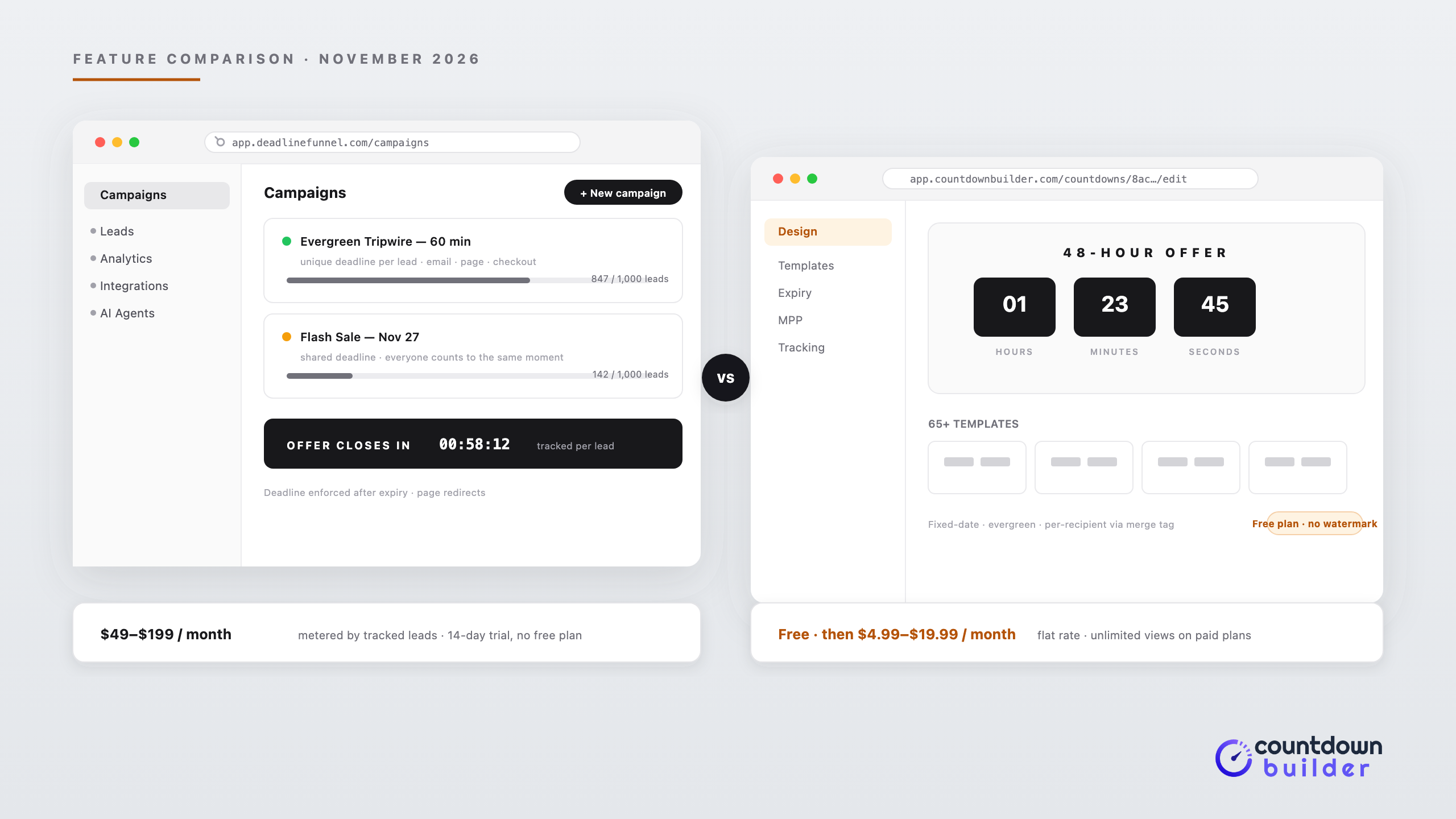
Deadline Funnel is not a countdown timer builder — it is an evergreen-funnel platform built around deadlines. It tracks each lead with cookie, IP, and email tracking, gives that lead one deadline, and syncs it across your emails, sales pages, and checkout pages, down to locking pages after the deadline expires. It reports 20,000+ creators and $100M in tracked sales since 2017, and its current platform adds AI agents that build campaigns and write funnel copy.
That machinery is the reason people search for an alternative. Some want a timer without a funnel platform around it. Some want pricing that does not scale with list growth. Some want a free plan to test with first. Countdown Builder is the timer service behind this blog, and this comparison sticks to each tool's published features and pricing — including where Deadline Funnel does a job Countdown Builder does not attempt.
Deadline Funnel
Website: deadlinefunnel.com
Starting Price: 14-day free trial, then from $49/month (or $39/month billed yearly)
Useful for: Course creators and digital-product businesses running evergreen funnels where one per-lead deadline must hold across email, sales pages, and checkout.
Features
- Per-lead deadlines synced across email, sales pages, and checkout pages
- Cookie, IP, and email tracking to keep a lead's deadline consistent
- Deadline enforcement: page redirects and offer lockout after expiry
- Email countdown timers personalized to each lead
- Floating bar, inline, and pop-up "portal" website timers
- Announcement bar campaigns
- 10+ campaign blueprints: evergreen, tripwire (15 minutes to 1 hour), product launch, holiday promo, flash sale, abandoned cart, automated webinar, page-only deadline, limited quantity, hybrid
- AI agents that build the campaign, write email and sales-page copy, and suggest optimizations
- Integrations with 50+ platforms: ActiveCampaign, Klaviyo, Mailchimp, Kit (ConvertKit), AWeber, Drip, Flodesk, GetResponse, MailerLite, Ontraport, HubSpot, Keap, Kartra, ClickFunnels, LeadPages, Unbounce, ThriveCart, Kajabi, Teachable, Thinkific, Podia, SamCart, plus a Shopify app
- Lead, click, and sales tracking per campaign
Pricing
| Plan | Monthly | Yearly (per month) | Campaigns | Tracked Leads/Month |
|---|---|---|---|---|
| Start | $49/mo | $39/mo | 3 | 1,000 |
| Create | $99/mo | $79/mo | Unlimited | 10,000 |
| Accelerate | $149/mo | $119/mo | Unlimited | 20,000 |
| Scale | $199/mo | $159/mo | Unlimited | 50,000 |
Every plan includes the campaign blueprints and a 14-day free trial, with a 30-day money-back guarantee. Custom colors, advanced customization, and removing Deadline Funnel branding start on the Create plan; priority support too. There is no free plan.
What Stands Out
The deadline is enforced, not just displayed. A lead whose 72 hours have expired can be redirected away from the offer — that is a different guarantee than a timer image showing zeros, and it is the core reason to pay funnel-platform prices.
The per-lead sync is the other differentiator. The countdown in the email, on the sales page, and at checkout all read from one tracked deadline, so a lead who clicks through never sees two clocks disagree.
Limitations
Pricing is metered by tracked leads per month, so the bill grows with your funnel's traffic whether or not timers render. Custom colors and branding removal are gated above the entry plan. And for a campaign that only needs a countdown image — a holiday promo, a launch date, a flash sale broadcast — the funnel machinery is more tool than the job requires.
Countdown Builder
Website: countdownbuilder.com
Starting Price: Free | Paid from $4.99/month (Email Countdown $5.99/month, Combo Pack $9.99/month, Business $19.99/month)
Useful for: Email marketers and e-commerce brands who need countdown timers — in email and on websites — at flat rates, with a free plan for testing.
Countdown Builder is a visual timer builder. It generates animated GIF timers for email and matching countdown timers for websites, with fixed-date, evergreen, and dynamic timer types. Full pricing is on the pricing page.
Features
- 65+ timer templates, 25+ fonts, custom labels in any language
- Fixed-date, evergreen, and dynamic timer types
- Per-recipient email deadlines via the dynamic timer's
endsAtparameter and your ESP's merge tags - Website countdown timers, matching your email campaign
- Expiry behavior per timer: zeros, custom text or image, and an expiry URL for late clicks
- Apple Mail Privacy Protection modes, including a styled static fallback, on every plan
- Real-time open tracking
- No watermark on the free plan
- Unlimited timers and views on paid plans
- Custom domain with SSL on the Business plan
- Works inside Mailchimp, Klaviyo, HubSpot, ActiveCampaign, Braze, Customer.io, and other major ESPs
Pricing
| Plan | Price | Notes |
|---|---|---|
| Free | $0/month | Watermark-free email and website timers |
| Website Countdown | $4.99/month or $49.90/year | Website timers |
| Email Countdown | $5.99/month or $59.90/year | Email timers |
| Combo Pack | $9.99/month or $99.90/year | Email + website |
| Business | $19.99/month or $199.90/year | Custom domain with SSL |
Paid plans include unlimited timers and views — the price does not move with list size or open volume.
What Stands Out
Flat pricing is the structural difference. A list generating thousands of tracked leads a month changes a Deadline Funnel bill; it changes nothing here.
The free plan is the other one: watermark-free, no credit card, email and website timers included. You can run a full campaign on it before paying anything.
Limitations
Countdown Builder is not a funnel platform. It does not track a lead across pages, it does not lock or redirect a page after a deadline, and it does not write your campaign copy. Per-recipient deadlines are wired through your ESP's merge tags rather than managed by tracking — you keep the deadline data in your own platform, and you set the automation up yourself.
Side-by-Side Comparison
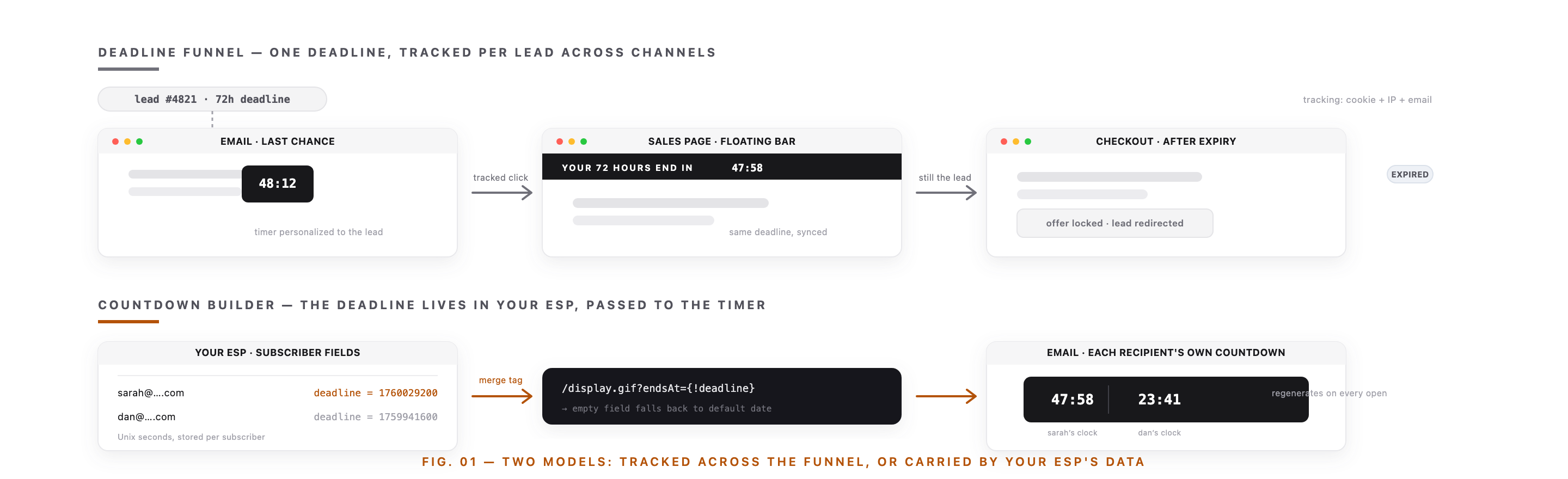
The structural difference in one picture: a tracked deadline that follows a lead through the funnel, or a deadline that lives in your subscriber data and renders in the timer.
| Feature | Deadline Funnel | Countdown Builder |
|---|---|---|
| Category | Evergreen-funnel platform | Timer builder |
| Deadline model | Per-lead, tracked across channels | Fixed-date, evergreen, or per-recipient via merge tag |
| Email timer | Animated, personalized per lead | Animated GIF, regenerated on every open |
| Website timer | JS floating bar, inline, portal | Standalone website countdown timer |
| Deadline enforcement | Page redirects and lockout | Expiry states in the timer itself |
| Templates and design | Campaign blueprints; custom colors from Create plan | 65+ timer templates on every plan |
| AI campaign and copy agents | Yes | No |
| Integrations | 50+, ESPs and page builders | All major ESPs (image + HTML embed) |
| View/lead metering | Tracked leads per month | Unlimited views on paid plans |
| Free plan | No (14-day trial) | Yes, watermark-free |
| Entry paid price | $49/month | $4.99/month (email $5.99/month) |
| Top plan | $199/month, 50,000 leads | $19.99/month, custom domain |
Feature availability and pricing can change. Check each provider's site — Deadline Funnel publishes current plan details on its pricing page, and Countdown Builder's are on ours.
Recreating an Evergreen Deadline Without a Funnel Platform
Most of what an evergreen funnel does with deadlines has a timer-builder equivalent — the work moves from the platform into your ESP. The mapping:
- A shared deadline (launch, holiday promo, flash sale). Set a fixed-date timer and embed it by URL. This is the majority case, and it needs no tracking at all.
- A per-subscriber deadline in email. Store each subscriber's deadline as a Unix timestamp in a custom field, then pass it through the
endsAtparameter in the timer's image URL via merge tag. The personalization guide covers the pattern, with walkthroughs for Customer.io, Braze, and other ESPs. A missing field falls back to the timer's default date, so nobody gets a broken image. - A deadline that starts on entry or first open. That is the evergreen timer type — the countdown starts per recipient instead of counting to a calendar date.
- What shows after zero. Expiry settings handle the timer's end state — zeros, a message, a custom image — and an expiry URL sends late clicks somewhere live instead of a dead offer.
- Apple Mail caching. MPP modes serve a styled static fallback when the animated GIF cannot be fetched fresh.
What has no equivalent here, honestly: cross-channel enforcement. Countdown Builder will not redirect a lead away from your sales page after their deadline, because it never tracked the lead in the first place. If your offer genuinely must lock — a limited-bonus cart that closes — you need Deadline Funnel's model, or page-level rules in your landing-page tool alongside the timer.
Which Should You Choose?
Consider Deadline Funnel if you run always-on evergreen funnels — tripwires, automated webinars, abandoned-cart sequences with real expiry — and the deadline must hold across email, page, and checkout, enforced. The lead-based pricing is the cost of that guarantee.
Consider Countdown Builder if you need countdown timers themselves: fixed-date campaigns, evergreen sequences driven from your ESP, per-recipient deadlines from your own data. You get a free plan, flat pricing, and the full template library, and the mechanics of the email timer — an animated GIF that regenerates on every open — are the same ones the funnel platforms use in the inbox.
A reasonable split also exists: funnel enforcement where you need it, a flat-rate timer everywhere else. Plenty of Deadline Funnel customers still run ordinary seasonal campaigns, and a timer builder covers those without a lead meter running.
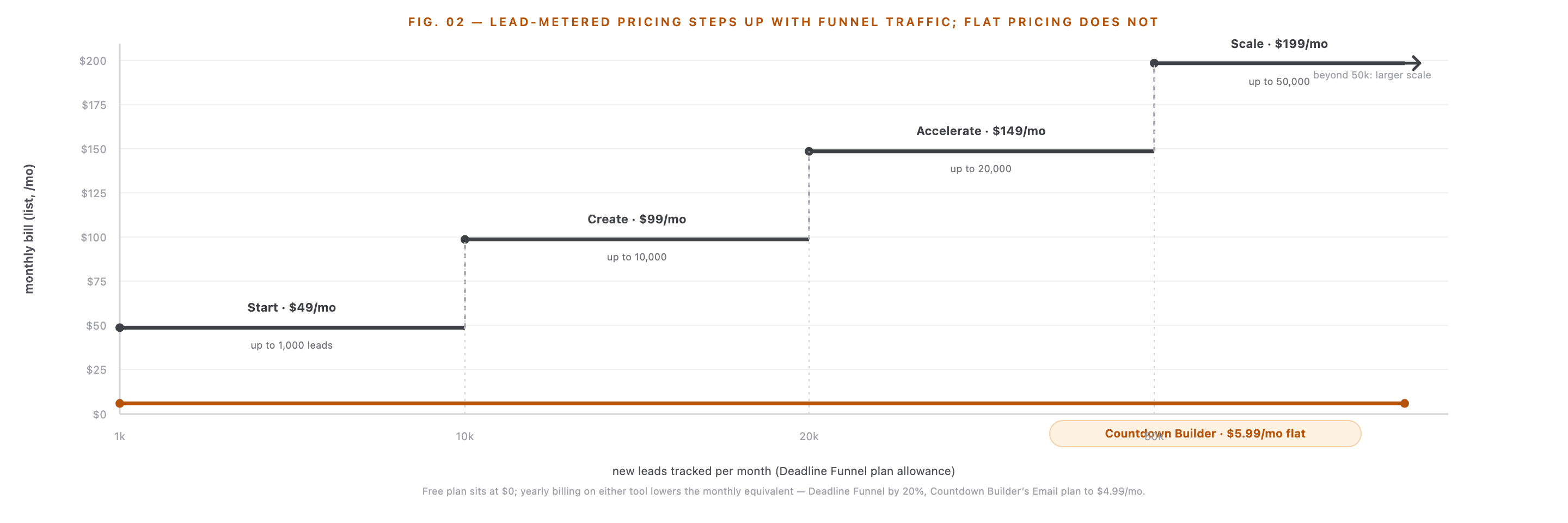
Lead-metered pricing steps up as funnel traffic grows; flat pricing does not move with volume.
FAQ
Does Countdown Builder sync one deadline across email and web pages like Deadline Funnel?
No. Email timers and website timers are separate, and there is no cross-channel lead tracking. Per-recipient deadlines are set in your ESP and passed to the timer via merge tag. If one tracked deadline must follow a lead from email to checkout, that is Deadline Funnel's job.
Is there a free plan for Deadline Funnel?
No — every plan starts with a 14-day free trial and carries a 30-day money-back guarantee, but there is no permanent free tier. Countdown Builder's free plan is watermark-free and includes both email and website timers.
Which is cheaper for a growing list?
They meter different things. Deadline Funnel bills by tracked leads per month — $49 at 1,000 leads, $199 at 50,000. Countdown Builder's paid plans are flat per product line, with unlimited views, so volume does not change the bill. At any lead count above the trial, the timer-builder route costs less; the question is whether you need the platform features it skips.
Can Countdown Builder run evergreen campaigns?
Yes — the evergreen timer type starts the countdown per recipient, and the dynamic timer counts to a per-recipient deadline from your ESP data. The evergreen guide covers how to build one. What it does not do is enforce the deadline on your pages after it passes.
Final Thoughts
The search term says "alternative," but the honest split is by job. Deadline Funnel sells enforced, per-lead deadlines across a funnel, metered by leads. Countdown Builder sells the timers themselves — email GIFs, website countdowns, per-recipient deadlines through your ESP — at flat rates with a free plan. If your campaigns are launches, promos, and sequences that need a visible clock, the timer builder is the simpler tool at a fraction of the cost.
If you want to see the timer side for yourself, you can start a free countdown timer — no credit card, no watermark, and both email and website timers on the free plan.
Related Guides
- Evergreen Email Countdown Timers
- 9 Email Countdown Timer Tools Compared in 2026
- CountdownMail Alternative: Features and Pricing Compared
- MailTimers Alternative for Email Countdown Timers: A 2026 Comparison
- How Do Email Countdown Timers Work? The Animated GIF, Explained
Last updated: November 2026. Pricing and features reflect each provider's published plans as of this date and can change — Deadline Funnel's current details are on their pricing page, and Countdown Builder's are on ours (pricing).
Written by Mehedi Hasan
Writer & Developer. He writes about email marketing, countdown timers, and campaign design.
Connect on LinkedIn