
Win-Back Emails with a Deadline: Countdown Timers for Re-Engagement
 By Mehedi Hasan
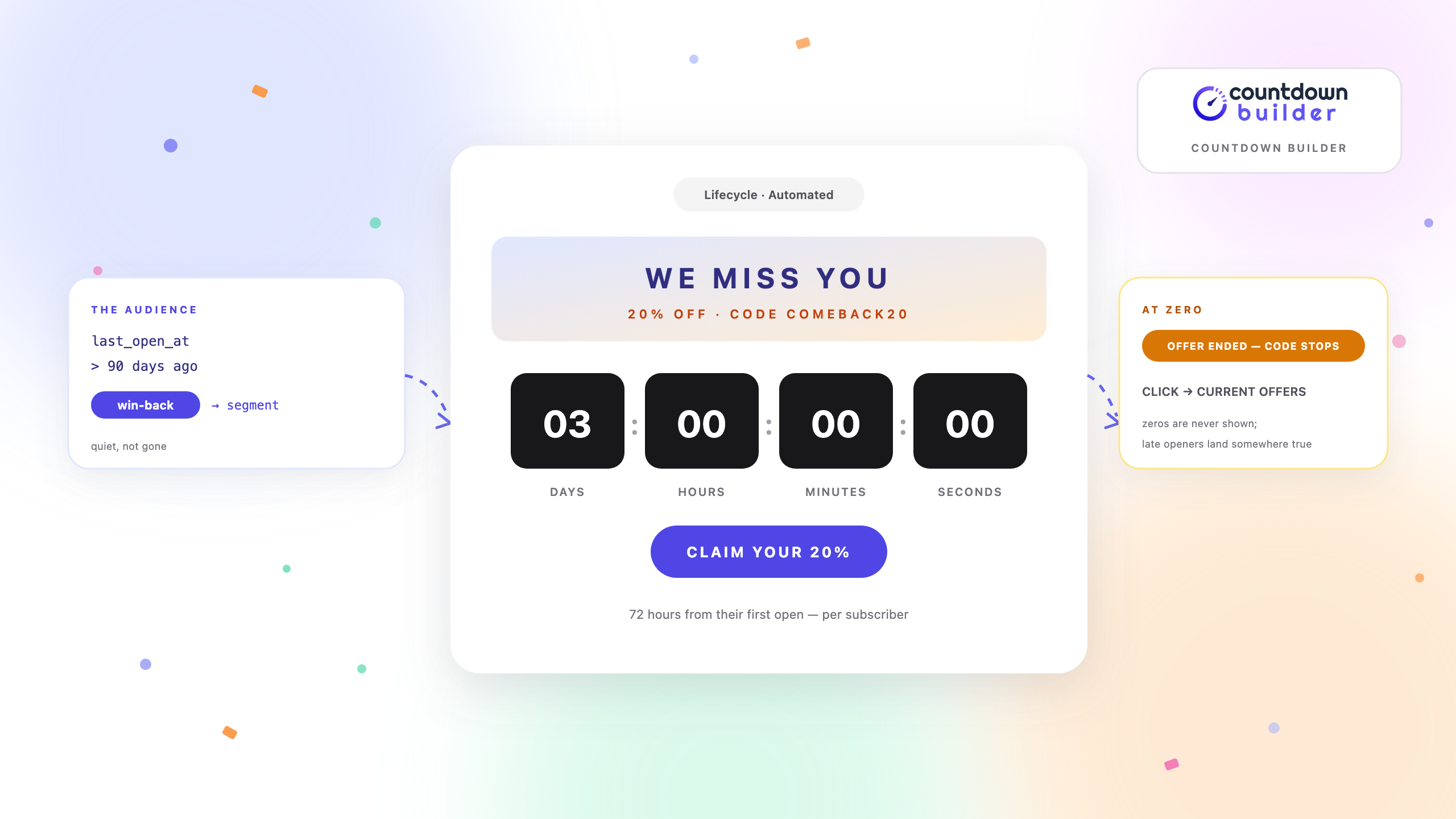
Every email list ages. Subscribers who opened everything in the spring go quiet in the fall, one at a time, for reasons you will mostly never know. The win-back campaign — also called a re-engagement campaign — is the sequence that goes after them: a few emails that try to restart the relationship before you accept it's over.
A countdown timer belongs in that sequence for one specific reason: dormant subscribers reopen old emails. They search their inbox, they buy a new phone and scroll, they return from a break and skim what they missed. A timer that regenerates on every open is still counting, correctly, weeks later — reporting a deadline the way a sent email can't.
But win-back is also the one lifecycle sequence where the deadline is entirely your choice, and that's where this guide spends most of its attention. A trial ends because the billing system says so. A cart hold expires because the store releases it. A win-back offer ends because you decided it does — which means you also own making zero mean something. The sections below cover the three deadlines that can honestly power a re-engagement timer, how to pick between an evergreen and a dynamic timer for each, the two send sequences, and the expiry states that catch every late opener.
Why Win-Back Emails Fit Timers — and Where the Risk Sits
- The audience is defined by a clock already. These are people whose last open, click, or purchase was 60 or 90 or 180 days ago. The segment itself was built from timestamps; the sequence just finally puts a visible clock in front of the subscriber.
- The deadline is the whole argument. A win-back email makes one claim: come back now, because now is better than later. The timer is that claim as an image. Without a real deadline, the claim is a bluff, and this audience has already heard your bluffs.
- The risk is unique to this sequence. Unlike the deadlines covered in the SaaS trial guide, no external system enforces a win-back window. If the discount code still works a week after the timer hits zero, the timer wasn't urgency — it was decoration, sent to exactly the people most likely to notice and least likely to forgive it.
The rule this post follows everywhere: the consequence at zero has to be real before the timer goes in the email. Pick the consequence first, the timer second.
What the Timer Counts To
Three deadlines can honestly power a win-back timer. One deadline per timer, one timer per deadline.
The offer window: 48–72 hours from their first look
The classic win-back mechanic: a comeback discount that genuinely expires a set time after the subscriber opens the offer email. This is the evergreen timer — the window starts at each person's first open, so someone who reads email daily and someone who checks in weekly each get the same fair 72 hours from the moment they finally pay attention.
The contract is simple and non-negotiable: the code stops working at zero. Not "stops being advertised" — stops working. If your store can't expire a code on a per-customer basis, use a single-expiry code with a fixed-date timer instead and say so plainly, because a window that isn't enforced is the failure mode this whole post is warning about.
A deadline computed from their own history
Some of the best win-back deadlines aren't offers at all — they're facts about the subscriber: loyalty points that expire on a date your database knows, a subscription that lapses on a known day, "it's been 30 days since your last order and your usual size is back in stock." These are per-person deadlines that exist before any email is written, which makes them the re-engagement cousin of the trial-end timestamp.
This is the dynamic timer's job: the embed carries each recipient's deadline as a timestamp resolved at send time, so the countdown is fixed at send and doesn't depend on the open at all. The SaaS guide covers the merge-tag wiring end to end — same mechanism, with your order history or CRM where that post has billing data.
The sunset date
The most honest deadline in re-engagement isn't the discount — it's the list policy. Many senders sunset inactive addresses: after a long quiet period, an address moves to a monthly digest, or stops receiving campaigns entirely. It protects deliverability, keeps the list made of people who asked for it, and it hands the farewell email the one thing marketing deadlines rarely have: a consequence that actually happens.
The sunset email states the date — "Friday, Dec 4 is your last day on the weekly list" — and the timer counts to it. When the sends genuinely stop on that date, the timer was pure reporting, and reporting is where countdowns are most credible.
Evergreen or Dynamic: What Starts the Clock
The three timer types differ in one question that matters enormously for a dormant audience: when does the window start?
| Type | The window starts | Fits in re-engagement when |
|---|---|---|
| Standard (fixed date) | A date you picked, the same for everyone | A one-time list cleanup, or a store-wide code with one public expiry |
| Evergreen | The subscriber's first open of the offer email | Comeback offers — the window should begin when they finally look |
| Dynamic | Nothing starts it — the deadline is fixed at send, from your data | Points expiry, lapse dates, last-order anniversaries |
Two practical notes on the evergreen route, because a win-back audience stresses exactly its weak points:
- Prefetch can start the clock early. Apple Mail Privacy Protection downloads remote images before the human looks. For an evergreen timer, that prefetch can count as the "first open," quietly starting someone's 72 hours before they've seen a word. Countdown Builder's MPP display modes are the mitigation: keep the animation, show a styled static fallback with the offer's end date, or hide the timer area. Whichever mode you choose, the deadline lives in the body copy too — "the code works for 72 hours from when you read this" — so the email survives a cached or blocked image.
- If the deadline must be exact, don't derive it from an open at all. Points that expire December 12, a plan that lapses on the billing anniversary — these are known timestamps, and the dynamic timer reports them without caring whether or when the email was opened. The evergreen post explains the first-open model in depth; the SaaS guide explains
endsAtwiring; between them, every win-back deadline has a home.
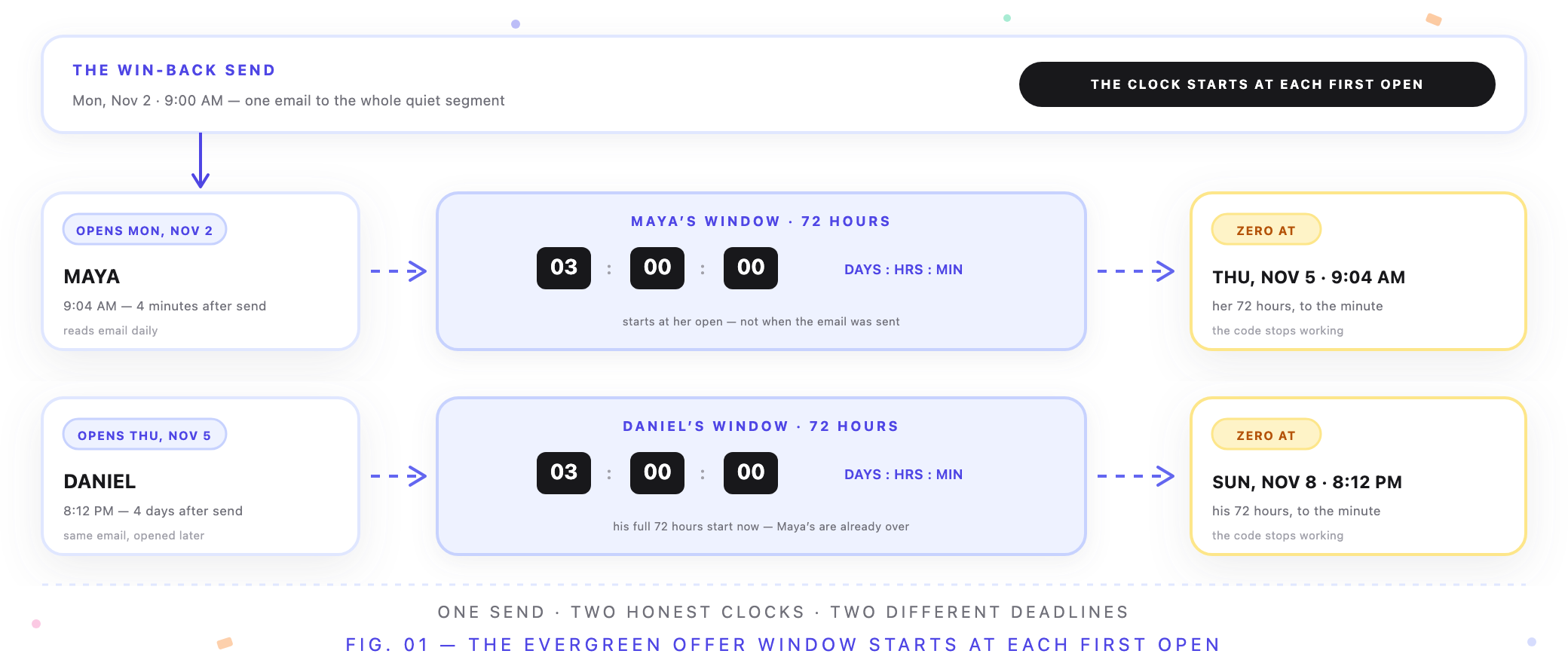
One send, two honest clocks — Maya's window ends Thursday, Daniel's ends Sunday, and neither is wrong.
The Send Sequences
Two arcs. The win-back arc tries to restart the relationship with an offer; the sunset arc is what happens, honestly, when it doesn't. Most lists run both, with the sunset arc catching everyone the win-back arc couldn't reach.
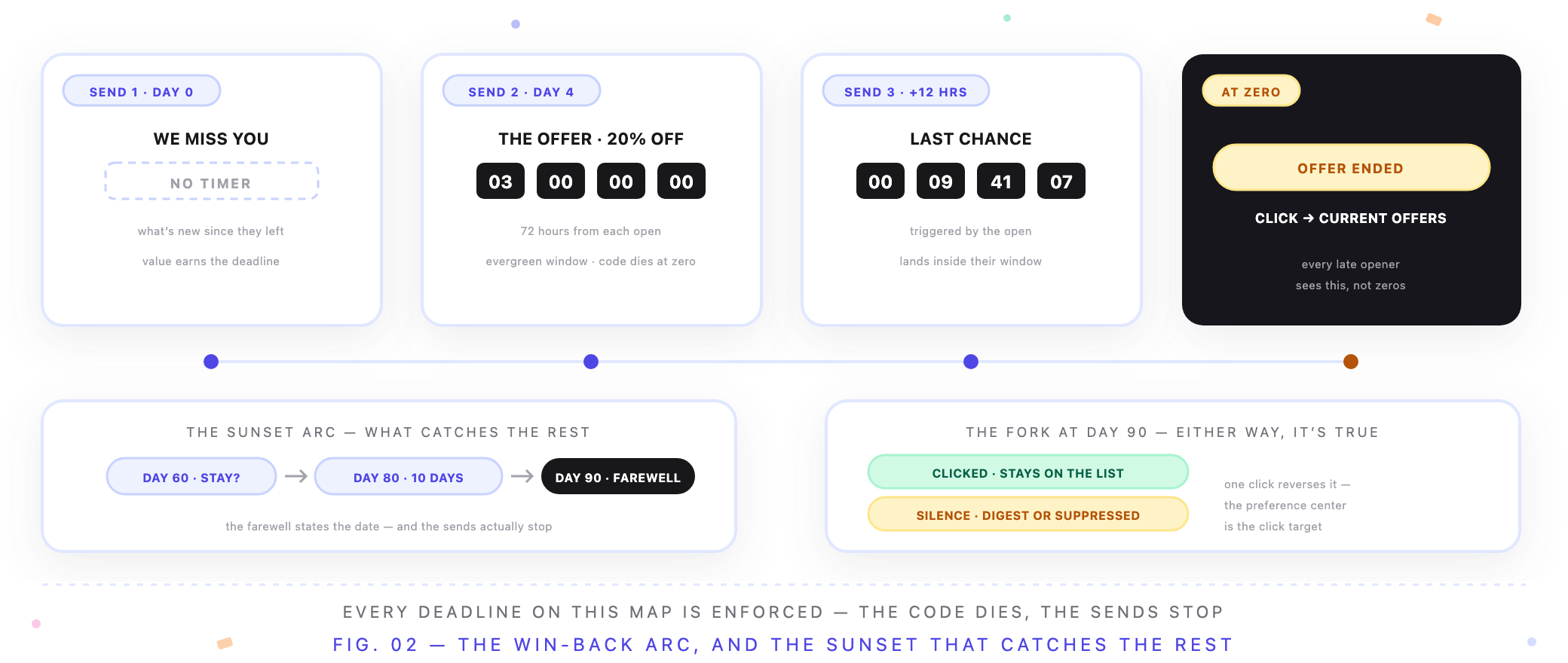
The win-back arc above, the sunset decision below — every card has a true state at zero.
The win-back arc (e.g., 20% comeback code, 72-hour window)
| Trigger | What the timer shows | |
|---|---|---|
| "We miss you" | Day 0 of the flow | No timer — re-introduce the product, what's new since they left, one clear link |
| "Here's 20% off" | Day 4 | 3 days — starting at each subscriber's first open of this email |
| "Last chance" | ~12 hours after that open, if they haven't bought | Hours — landing inside their personal window |
| After zero | Any later reopen | Expiry state: "Offer ended — here's what's still available" |
Two things in that table are deliberate. The first email carries no timer: pressure before value is how "we miss you" reads as "we want money," and the reintroduction has to earn the right to a deadline. And the last-chance send is triggered off the offer email's open, not off a calendar day — since everyone's window ends at a different moment, a day-based schedule would send "last chance" to people whose window already closed. Your ESP's open-triggered branching handles this; the timer embed is the same image in every send.
The sunset arc (e.g., 90-day inactivity policy)
| When | What the timer shows | |
|---|---|---|
| "Do you still want these?" | Day 60 of inactivity | No timer — one click to stay, one to go |
| Final notice | Day 80 | 10 days — the removal date, stated in text as well |
| Farewell or confirmation | Day 90, or immediately on a click | Expiry state: "You're on the monthly digest" / "You stayed — welcome back" |
The farewell email deserves its reputation. A message that finally says something true and slightly sad — we're going to stop emailing you — pulls replies from people who ignored eighteen happier emails before it. And the click that says "keep me" must suppress the rest of the arc instantly; making someone opt in twice is how a polite goodbye becomes the last straw.
If your policy runs on each subscriber's own 90-day mark, the sunset timer is dynamic (each removal date computed per person). If you clean the list quarterly on one shared date, it's a fixed-date timer. Both are honest; the timer type just follows where the date lives.
What the Timer Becomes at Zero
Dormant subscribers are the latest openers of any audience you have. Weeks after the sequence ends, someone will search their inbox, find the offer email, and look at the timer. What it shows then is a decision you make in advance.
With expiry settings, the spent timer swaps to a custom frame, and — because the countdown image is clickable — forwards somewhere that's still true:
- Offer window: "Offer ended" → your current offers page, or the catalog at full price. Not a dead link, not zeros, and not a working code that undercuts everyone who bought on time.
- Sunset: "You're on the monthly digest" → the preference center, so the one click that reverses the decision is right there.
- History-based deadlines: the timer's zero state should state the fact — "Your points expired Dec 12" — and forward to the account page where the truth lives.
One trap to design against: re-arming the same offer. The win-back arc ran, the segment stayed silent, and the temptation next month is to send the identical "final 72 hours" again. The second run converts the word final into wallpaper — for the people who received both, every deadline you ever send again is discounted. If the first arc fails a subscriber, they belong in the sunset arc, not in win-back round two.
Design Notes for a Half-Listening Audience
- Design for the skim on a phone. Dormant subscribers read in passes, on mobile, with half their attention. Large digits, high contrast, the offer in text next to the image — any of the 65+ templates can be tuned to your brand so the timer reads as your product speaking, not an ad network.
- Pick a template whose frozen frame works. A share of any B2B list opens in Outlook on Windows, which renders a still frame instead of the animation. A comeback email whose frozen timer reads "00 : 14 : 33" mid-window is fine; one that's illegible isn't. The troubleshooting guide covers which clients freeze and how to design around it.
- Test dark mode. Apple Mail and Outlook's dark backends can invert or dim backgrounds; a timer tuned only against white can wash out. Check the digit-to-background contrast in both modes before the sequence goes live.
Subject Lines
The subject should state the real moment; the timer shows it live.
Win-back offer
- Still thinking it over? Your 20% holds for 72 hours
- We saved you a code: COMEBACK20, three days
- Last call for your 20% — then it's regular price
- It's been a while. The 20% hasn't expired yet
Sunset
- Do you still want these emails?
- Last week on the weekly list — say the word
- You're moving to the monthly digest (unless you'd rather stay)
- It's been quiet. Stay or go?
Notice what's absent: no "FINAL NOTICE!!", no false urgency, no subject the body can't cash. This audience has received those before, from you or someone else, and gone quiet anyway.
Common Mistakes
- A deadline that isn't. The code works at zero, the "removal" never removes, the points get extended silently. Every one of these is discovered eventually, and each discovery discounts every future deadline you send.
- The timer on email one. The "we miss you" send earns the right to a deadline by re-delivering value first. A clock on the reintroduction reads as a debt collector's opening line.
- A window that outlives its excuse. Fourteen days isn't a window, it's a price change. Comeback discounts justify 48–72 hours; longer than that and the timer is counting to a decision the subscriber has no reason to rush.
- A window they can never see. Dormant means sporadic opens — a 24-hour offer can expire entirely unread. Check when this segment actually opens (your ESP knows), and set the window so a typical reader sees at least two chances inside it.
- Prefetch eating the window. With an evergreen timer and no MPP fallback, Apple Mail's prefetch can start and mostly consume a 72-hour window before the human ever looks. Static fallback on, deadline in body copy — or a dynamic timer whose deadline never depended on the open.
- Rewarding absence over loyalty. A comeback discount deeper than anything your active customers can get is a support ticket waiting to be filed, and a quiet insult to the people who never left. Cap win-back offers at or below your best public promotion.
- The sunset that never sets. Announcing removal quarterly and never removing anyone trains the list that your deadlines are theater. Run the policy you announced, or announce the policy you'll run.
Building the Timers in Countdown Builder
All three timers are standard configurations, and the deep-dive guides carry the step-by-step:
- The offer-window timer is an evergreen timer with its duration set to the window (72 hours in the examples above). One embed serves the whole arc — every send carries the same image, and each subscriber's window starts at their own first open. The evergreen guide walks through creation with screenshots, including duration guidance by campaign type.
- The history-based timer is a dynamic timer whose
endsAtparameter resolves from the merge tag that holds the per-person deadline. The SaaS lifecycle guide covers the wiring, the fallback behavior, and the Unix-seconds unit gotcha end to end. - The sunset timer is whichever type matches where the removal date lives: fixed-date for a shared cleanup day, dynamic for per-subscriber 90-day marks.
All three get an expiry state and a click destination that remain true after zero — configured once in expiry settings, inherited by every send in the sequence. To draft the first one, you can create a free countdown timer in a couple of minutes; the free plan needs no credit card and adds no watermark.
Costs for an Always-On Sequence
Subscribers don't go quiet on a schedule — every day, a few more cross the 60-day line, so the win-back and sunset flows trigger continuously rather than in bursts. On paid plans, pricing is flat per account rather than per send or per view, so a growing quiet segment doesn't grow the timer bill. The free plan carries the full setup with no watermark and no credit card. Current plan details are on the pricing page.
Final Thoughts
The win-back sequence asks people who stopped listening to believe one more claim, and the countdown timer is that claim compressed into an image. It earns belief only when zero means something: the code dies, the digest takes over, the weekly sends stop. Choose that consequence first, pick the timer type that matches where its date lives — first-open for comeback offers, your own data for history-based deadlines, the policy date for sunsets — and the sequence says the one thing dormant subscribers rarely hear from an email: this is true, and it ends when it says it does.
When the next cohort crosses the quiet line, you can make an email countdown timer, point it at the deadline you've decided to honor, and have the offer email's clock running before the copy is final.
Related Guides
- Trial-Expiry and Renewal Countdown Emails for SaaS
- Evergreen Email Countdown Timers
- Course Launch Emails with a Countdown Timer
- Email Countdown Timer Not Working? 7 Causes and Fixes
- 15 Email Countdown Timer Examples (Annotated)
- The Psychology of Scarcity: Why Countdown Timers Actually Increase Sales
Last updated: October 2026. Example dates follow the 2026 calendar. Product features and pricing reflect Countdown Builder at the time of updating and can change; see the pricing page for current details.
Written by Mehedi Hasan
Writer & Developer. He writes about email marketing, countdown timers, and campaign design.
Connect on LinkedIn