
Easter Countdown Timer Emails: The 2027 Playbook
 By Mehedi Hasan
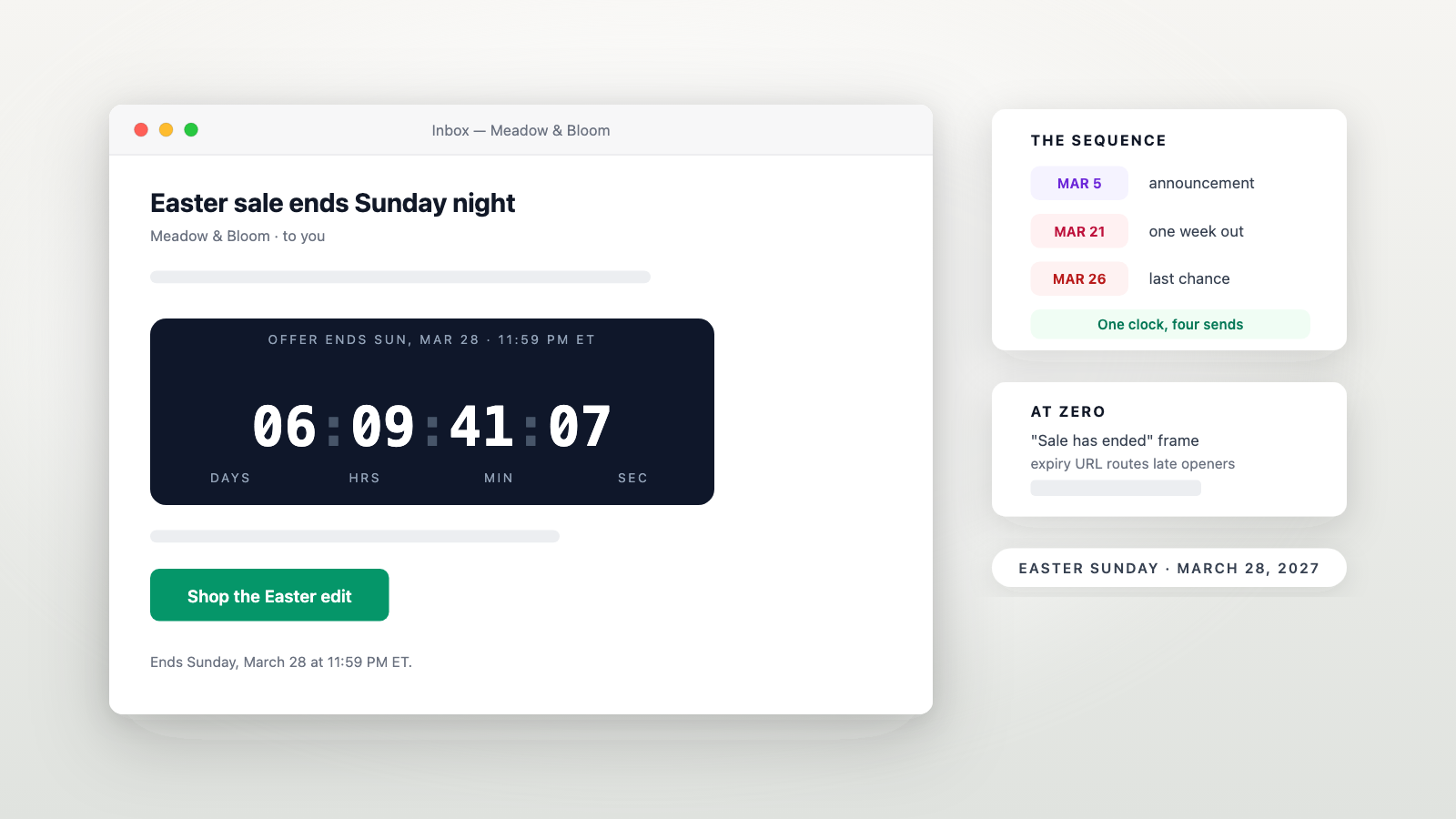
Short answer: an Easter countdown timer email is a spring offer email with a live image counting down to your real cutoff — and in 2027 that campaign points at Sunday, March 28. Build one timer, state the same deadline in words as a backup, and reuse it from the early-March announcement through the Easter weekend wrap.
Easter is the first widely shared retail moment of the year after the New Year window clears. Baskets, spring wardrobes, home refreshes, table settings — and for most shops, the first natural excuse for a seasonal sale since January. Like Black Friday, the deadline is public: it is printed on physical and digital calendars, which means nobody has to be convinced the offer genuinely ends.
But Easter has one wrinkle Black Friday never does: the date moves every year. It can land anywhere between March 22 and April 25, and in 2027 it lands on the early side: Sunday, March 28 — the earliest Easter since 2016 (the year-by-year table shows every Easter from 2017 through 2026 fell between March 31 and April 21). A countdown timer for email settles that ambiguity in one glance — the clock and the date in your copy always agree, which is exactly what a movable holiday needs.
This guide covers the 2027 dates to plan around, the email sequence, how one timer serves the whole campaign, subject lines, copy-ready templates, and setup. If you are stitching a full-year calendar, the countdown timers for holiday campaigns guide covers the Q4 window this playbook follows, and the New Year email playbook bridges December into January.
Why Countdown Timers Fit Easter
- The deadline is public. Nobody doubts that Easter arrives on March 28 in 2027. Your timer points at a date that already exists — the same credibility advantage Black Friday has.
- The date moves, and most readers have not checked it. Because Easter wanders across a five-week range, plenty of subscribers assume it lands in mid-April by default. A visible clock plus the date in words removes the guesswork from your offer window.
- 2027 is an early Easter. March 28 compresses the spring calendar — the gap between "New Year is over" and "Easter week" is shorter than usual, which makes each send in the sequence matter more.
- The inbox is quieter than Q4. Easter does not carry BFCM's ad load. A clear offer with a visible deadline has more room to breathe in a March inbox than the same email would in a November one.
The 2027 Dates to Plan Around
| Date | Day | What it is |
|---|---|---|
| Early March | — | Announcement window — the sale or Easter shop opens |
| Sun, Mar 21 | One week out | The weekend-before send moment |
| Fri, Mar 26 | Friday before Easter | A common last-chance send day — a public holiday in many countries (not a US federal holiday) |
| Sun, Mar 28 | Easter Sunday | The date the whole campaign points at |
| Mon, Mar 29 | Easter Monday | Public holiday in much of Europe and Canada; the natural wrap or clearance day |
Two notes on this calendar:
- The holiday is not your deadline — your offer is. A sale can close Friday night for a pre-Easter push, run all weekend and end Monday, or skip the holiday entirely. Pick the cutoff your store will actually enforce; the timer counts to that moment, and the copy states it.
- The long-weekend days differ by country. Friday, March 26 and Easter Monday are public holidays across much of Europe, Canada, and Australia, but not US federal holidays — worth remembering if your support hours or shipping promises feature in the campaign.
The Easter Email Sequence
Four scheduled sends carry the campaign; automated flows run underneath them.
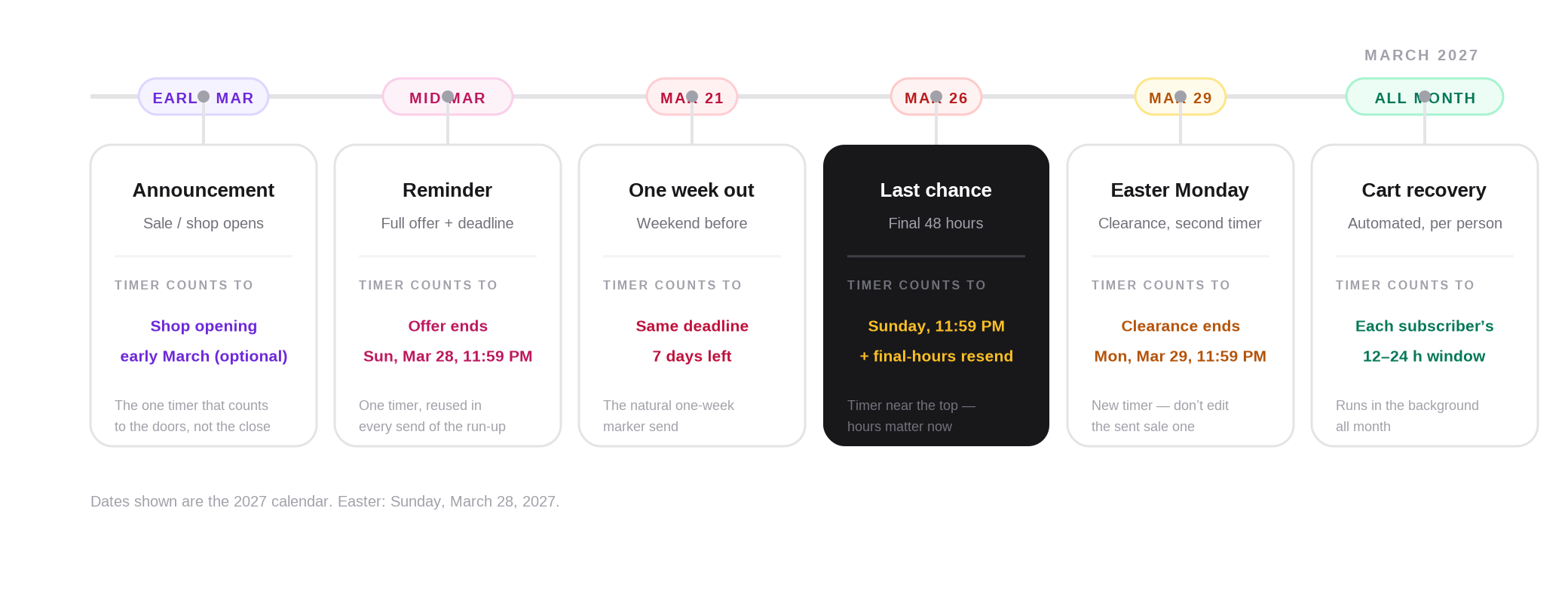
| When | What the timer counts to | |
|---|---|---|
| Announcement | Early March | Optional — the moment the Easter shop opens |
| Mid-March reminder | Mid-March | Your offer's real end date |
| One week out | Sun, Mar 21 | The same end date — one week left |
| Last chance | Fri, Mar 26 | Ends Sunday at 11:59 PM — hours matter now |
| Easter Monday wrap | Mon, Mar 29 | A second timer for the clearance cutoff, if you run one |
| Cart & browse recovery | All month, automated | Each subscriber's own short window |
Three details make the sequence work:
- The announcement timer is optional. If your Easter shop opens the moment the email lands, a timer counting to the opening works like the New Year teaser. If the sale is simply live, skip it — the timer belongs on the deadline, not the doors.
- The weekend-before send is your one-week marker. March 21–22 is the natural "seven days left" moment — close enough to matter, far enough that late deciders can still act.
- The Friday send leads with the timer. By March 26 the sequence has shown the same deadline three times, which is what makes the last-chance claim credible. The last-chance email examples show how final-hours layouts are built.
One Timer, Every Send
The same reuse rule the Q4 playbooks rely on holds here: build one timer for the sale, paste the same embed into every send. An email countdown timer is a live image, regenerated with the correct time remaining on every open — so the subscriber who opens the March 5 announcement on March 26 sees hours left, not a stale "3 weeks." One URL also means one deadline everywhere: email, website countdown timer on the sale landing page, and exit pop-up all agree.
Three setup notes that matter more at Easter than most seasons:
- State the date in words too. Because readers are used to Easter wandering, "Ends Sunday, March 28 at 11:59 PM" beside the clock is doing real work — it survives blocked images and preempts the "wait, when is Easter?" pause. The animated image explains the mechanics; the practical version is that the email countdown timer keeps every touchpoint on one deadline.
- Set the expiry state before the first send. Easter emails keep getting opened for weeks — late openers, archived baskets, school-holiday inboxes. Configure what a spent timer shows: frozen zeros, a short "sale has ended" frame, or an expiry URL routing to your next-best page. The options are in the expiry settings.
- Apple Mail readers are already handled. The timer regenerates on open, so Mail Privacy Protection does not break it — the MPP modes cover the fallback options. Outlook's Windows desktop client shows a still frame of the current time remaining, so pick a template whose frozen frame reads cleanly.
Building the Easter Timer in Countdown Builder
The setup takes minutes:
Step 1: Pick the real cutoff and set it
Start from the offer policy, not the timer: what date and time does checkout actually enforce? Set the timer to that moment, built in the timezone your audience shops in — the timer counts to the timezone configured with it, not each reader's local midnight, so a US-focused sale should be built in the timezone your copy states. The localization settings cover the options.
Step 2: Pick a template that fits the season
Countdown Builder includes 65+ templates. For Easter, soft palettes and spring colors fit the season — but legibility wins over theming: check that the digits still read at phone width and that the frozen first frame survives Outlook's still-frame rendering. The template guide covers the range, and custom labels let you set phrasing like "Basket closes in" instead of a generic default.
Step 3: Make the image clickable
The biggest element in the email should land on the offer, not the homepage. Enable Clickable countdown image in the editor and point it at the Easter sale page.
Step 4: Configure expiry before launch
Decide now what March 29+ openers see — zeros, an ended frame, or a redirect to your post-Easter page. This is the step that keeps an Easter campaign from leaving zombie clocks in archived mail.
Step 5: Copy the embed into your ESP
The snippet is an image plus a line of HTML — no JavaScript — so it pastes into any platform that accepts an image or HTML block, and works anywhere images load. Then repeat for the second timer if you run an Easter Monday clearance (deadline: your Monday cutoff).
Subject Lines for Easter Countdown Emails
The subject carries the deadline in words; the timer carries it visually. Each line is true only if the timer agrees.
- The Easter sale is live — X% off through March 28
- The Easter shop opens today
- One week left — the Easter sale ends March 28
- 48 hours left on the Easter sale
- Last call — the Easter sale ends Sunday night
- The Easter sale ends tonight at 11:59 PM
- Easter Monday clearance is open — today only
- Your cart still has Easter pricing in it
Preheaders that add detail instead of repeating the subject:
- The timer in this email is counting to the real deadline.
- Everything ends Sunday, March 28 at 11:59 PM timezone.
- One weekend left — then the shop closes.
- The clearance clock runs out tonight.
Copy-Ready Easter Templates
Three skeletons to adapt. Keep copy around the timer short — the clock does the urgency work.
Announcement (early March)
Subject: The Easter sale is live — [X]% off through March 28
Preheader: The timer in this email is counting to the real deadline.

Hi [First Name],

Our Easter sale is open: [offer details], through Sunday,
March 28 at 11:59 PM [timezone].

[Countdown timer — set to your close date]

Shop the Easter edit: [CTA]

When the timer hits zero, pricing goes back. No extensions.
Last chance (Friday, Mar 26)
Subject: 48 hours left on the Easter sale
Preheader: Everything ends Sunday, March 28 at 11:59 PM.

[First Name],

The Easter sale closes Sunday night. As of this email,
48 hours are left.

[Countdown timer]

If something has been sitting in your basket, this is the
weekend to finish it.

[CTA: Finish Before Sunday]
Easter Monday clearance (Mar 29)
Subject: Easter Monday clearance — today only
Preheader: The clearance clock runs out tonight.

The Easter weekend is over. The clearance isn't — until
tonight.

[Countdown timer — set to your Monday close time]

Leftover stock, one last price, ends 11:59 PM tonight.

[CTA: Shop Clearance]
Common Easter Timer Mistakes
- Shipping last year's dates. Easter 2026 fell on April 5; 2027 lands on March 28. Clone-and-edit campaigns are how wrong dates survive year to year — rebuild the email from a dated template rather than editing last spring's files in place.
- Counting to the holiday instead of the offer. If checkout stops discounting Friday night, a timer running to Sunday evening is publicly lying for two days. The timer, the copy, and the checkout must state one moment.
- Planning Easter for April by default. In 2027 the holiday lands on March 28, and a calendar built on the usual mid-April assumption misses the window entirely. Anchor the campaign to the date, not the month.
- Timezone drift. A timer built in UTC under copy that says 11:59 PM ET will publicly disagree with itself for part of your list. Build in the audience's timezone and match the words to it.
- No expiry state. An Easter timer frozen at zeros under a "last chance" subject — still circulating in mid-April — is worse than no timer. Configure the expiry message and expiry URL before the first send.
FAQ
When is Easter 2027?
Sunday, March 28, 2027. The Friday before (March 26) and Easter Monday (March 29) frame the long weekend — the natural last-chance and clearance days.
Why does the Easter date change every year?
Easter's date follows a lunisolar calendar rule rather than a fixed day, which moves it within a window between March 22 and April 25. March 28, 2027 sits on the early side of that window — the earliest date since 2016. That drift is exactly why the exact date belongs in your campaign copy instead of an assumed month.
Should the countdown end on Easter Sunday, or earlier?
It should end when your offer actually ends. If your sale genuinely runs through Sunday, March 28 at 11:59 PM, that is the perfect deadline. If checkout stops Friday night or Monday evening, count to that moment instead — the timer must match what the store enforces.
When should I start sending Easter emails?
For a March 28 holiday, open with an announcement in early March, keep the mid-March reminder short, use the March 21–22 weekend as the one-week marker, and send the last chance on Friday, March 26. Automated cart and browse flows run underneath the whole month.
Do countdown timers work in every email client?
They work anywhere images load, because the timer is an animated image with no JavaScript — Gmail, Apple Mail, Outlook on the web and Mac all play it, and it regenerates on every open. Outlook's Windows desktop client shows a still frame of the current time remaining, which is why the frozen frame should be legible.
Is there a free countdown timer for Easter emails?
Yes — the Countdown Builder free plan has no watermark and requires no credit card, with 65+ templates to start from. Paid plans add unlimited timers and views if the sequence outgrows the free tier.
Final Thoughts
Easter rewards the same discipline every seasonal campaign does: one real deadline, shown consistently, ended honestly. Its one extra wrinkle — a date that moves every year — is also its best argument for a visible clock: when the holiday itself is easy to misremember, the timer and the stated date are what keep the whole campaign anchored. Set the cutoff your store will actually enforce, let one timer carry it from the announcement to the final hours, and let it expire for real.
You can create a free email countdown timer and have the embed ready well before the Easter weekend. Current plan details are on the pricing page.
Related Guides
- Black Friday Email Countdown Timer: The 2026 BFCM Playbook
- New Year Sale Countdown Timer: The Dec–Jan Email Playbook
- Countdown Timers for Holiday Campaigns: A Practical Guide
- Mother's Day Email Countdown Timer: The 2027 Playbook
- Website Countdown Timer: Engage Visitors and Boost Conversions
- Last-Chance Emails: Annotated Examples + the Final-Hours Sequence
Last updated: November 2026. Dates follow the 2027 calendar — Easter falls on Sunday, March 28, 2027. Product features reflect Countdown Builder at the time of updating and can change — see the pricing page for current plans.
Written by Mehedi Hasan
Writer & Developer. He writes about email marketing, countdown timers, and campaign design.
Connect on LinkedIn