Last-Chance Emails: Annotated Examples + the Final-Hours Sequence
 By Mehedi Hasan
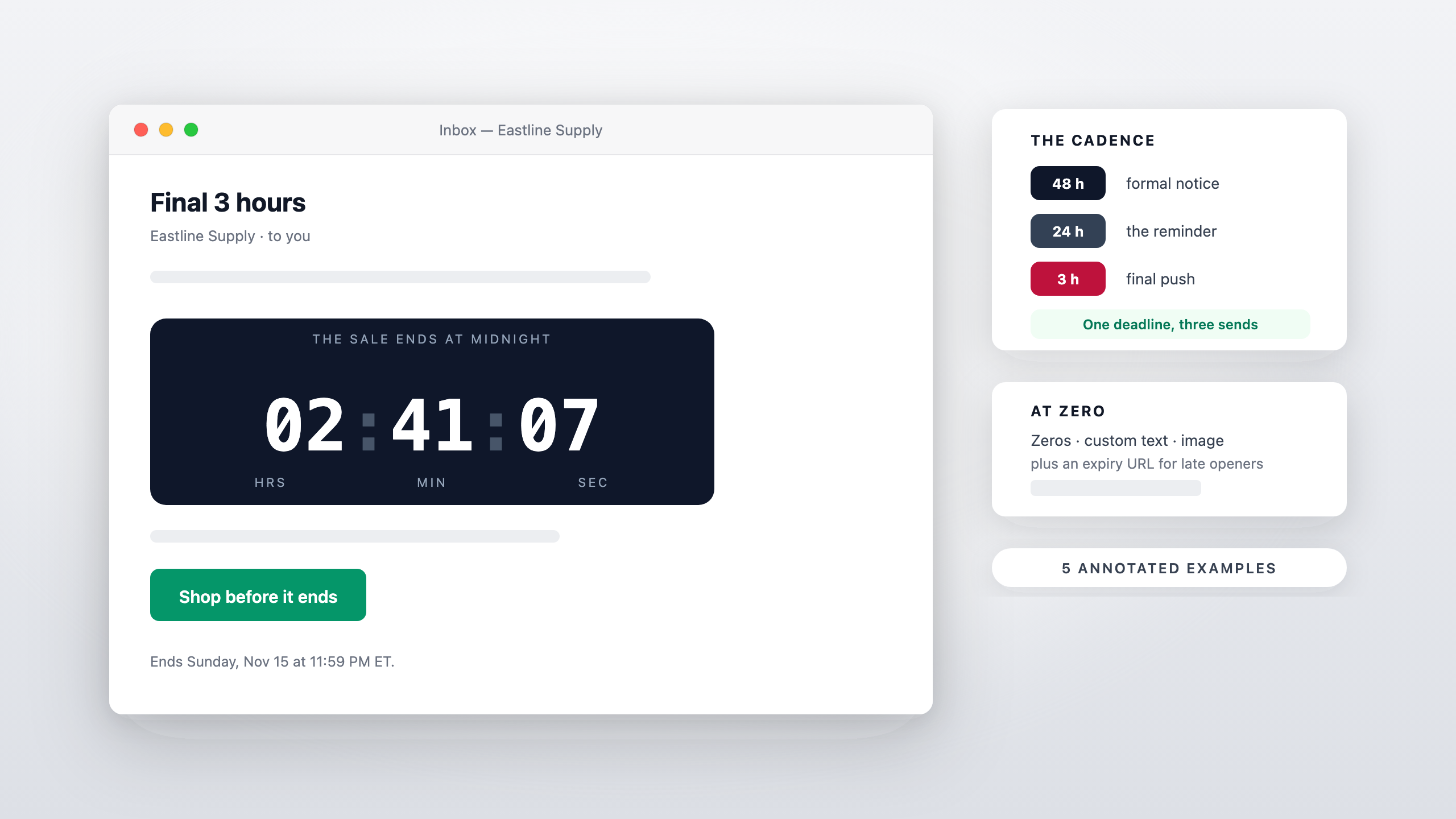
Short answer: a last-chance email is the send that goes out in the final 48 hours of a real deadline — typically three of them, at the 48-hour, 24-hour, and final-hours marks — each carrying a countdown timer set to the same end date the offer actually enforces. It exists to convert the subscribers who saw the earlier emails, meant to act, and didn't. Below: the cadence, five annotated examples, and what the timer should show at zero.
The strategy behind why urgency works is covered in the urgency and end-time messaging guide — this page is the execution layer: what to send, when, and what it looks like.
The Cadence: 48 → 24 → Final Hours
The sequence assumes a deadline the offer genuinely enforces — a sale end, a cart expiry, an enrollment close. Working backward from the end:
- T–48 hours. The formal notice. "The sale ends day" — calm, informative, aimed at subscribers who need a reason to act today instead of tomorrow.
- T–24 hours. The reminder. Shorter, more direct, leading with the timer. This send catches the "I'll do it tonight" crowd before the last day fills up.
- T–2 to 4 hours (send morning-of for midnight deadlines). The final push. Pure deadline: hours left, one CTA, nothing else competing in the email.
- At zero. Not a send — a state. The timer shows its configured expiry state everywhere the email is still being opened.
One offer, one deadline, three sends. Adding a fourth "we extended!" send converts the sequence into the fake-urgency pattern — the reset that trains subscribers to ignore every future deadline.
The Anatomy of a Last-Chance Email
Across all five examples below, the same five parts:
- A subject line that states the time left — "Ends tonight," "48 hours," "final 3 hours." Vague urgency ("time is running out!") without a number underperforms a specific one and reads as spam.
- One countdown timer, in the decision space — next to the CTA, not buried in the footer.
- The deadline in text as well — "Ends Sunday, 11:59 PM ET" — so the email still converts for the share of the list that blocks images, and so the claim is written down.
- One CTA. A last-chance email with two competing buttons converts on neither.
- A plan for zero — the expiry state and, where relevant, an expiry URL.
Five Annotated Examples
Written as layouts you can restyle — the same approach as the 15-example gallery, focused on the end of a campaign.
1. The 48-hour notice (sale end)
Subject: The sale ends Friday — here's what's left
Short intro: the sale ends Friday at 11:59 PM, here are the three categories worth a look.
[Countdown timer — days:hours to Friday 11:59 PM]Bestsellers grid (3–6 items) → one CTA: "Shop the sale."
Why it works: the timer shows a day-level countdown because two days is still readable as "Friday." The bestsellers grid gives subscribers who never opened the earlier emails a reason to buy now rather than a reason to feel late.
2. The 24-hour reminder (cart or enrollment)
Subject: Your cart closes at midnight
One line: what's in the cart, one line: what happens at midnight.
[Countdown timer — hours:minutes to midnight]Cart contents (thumbnail + name + price) → one CTA: "Complete my order."
Why it works: hours-level countdown because the deadline is now concrete. The cart contents do the persuasion; the timer does the clock. Same layout works for course enrollment closes — swap the cart block for the enrolled-modules preview (the course-launch guide covers that sequence).
3. Final hours (morning-of, midnight deadline)
Subject: Final 3 hours
One sentence. No product grid, no argument for the offer — everyone still reading has already decided whether they want it; they're deciding whether to act.
[Countdown timer — large, hours:minutes:seconds]One CTA, high contrast, nothing below the fold.
Why it works: the shortest email in the sequence carries the largest timer. Seconds-level digits are the point — the visual message is "the clock is running," and nothing else competes with it.
4. The at-zero state (what late openers see)
Not a send — what the same email displays after the deadline passes, to subscribers who open it late:
[Timer expired — configured state: "This offer has ended" or zeros]The CTA lands on an expiry URL with the real current state: the offer gone, or a "see what's next" page.
Why it works: late openers are inevitable — every campaign has them. A timer frozen at 00:00:00 with a working CTA to a dead offer is a broken experience; a configured expired state with a truthful destination keeps the ending clean. Expiry settings cover the three options (zeros, custom text, custom image) and the redirect.
5. The evergreen last chance (per-subscriber window)
Subject: Your 48-hour window closes tonight
One line: the code started when the subscriber entered; it ends tonight, at their own deadline.
[Dynamic timer — endsAt = signup time + 48h, per recipient]One CTA.
Why it works: automated sequences produce last chances too — the welcome-offer window, the trial's final day (the SaaS trial guide covers that case). The timer is dynamic: each recipient counts to their own genuine deadline via an endsAt parameter. It's a real last chance because each window really ends — the honest evergreen model from the evergreen timer page.
Subject Lines for the Final Hours
- "48 hours left" / "24 hours left" / "Final 3 hours"
- "Ends tonight: offer"
- "Last day for offer"
- "Midnight deadline — consequence"
- "Closing tonight: what they get"
- "This is the last email we'll send about this"
The last one is a pattern worth keeping: it's true (the deadline ends the sequence), and truth is the asset the whole cadence runs on.
Common Mistakes
- The fake extension. "Ending tonight!" followed by "extended by popular demand!" is the fastest way to teach your list that deadlines are decoration — and it's the pattern regulators treat as deceptive. If a real business event forces an extension, say what it is and give a new real end date, once.
- Two timers, two deadlines. A sale-end timer and a shipping-cutoff timer in one email tell the reader neither is real. One email, one deadline.
- Hours-level countdowns too early. "72 hours!" reads as manufactured panic; day-level until T–24 is the natural scale.
- Sending the final push to converters. Suppress anyone who already bought. A last-chance email to someone who completed checkout is a support ticket waiting to happen.
- No expiry state. The timer keeps "counting" into a dead offer for late openers. Configure the zero state before the first send, not after the first complaint.
FAQ
How many last-chance emails should I send?
Three for a major deadline: 48 hours, 24 hours, final hours. Two (24 hours + final hours) is enough for smaller offers. More than three and the send itself becomes the reason subscribers tune out deadlines.
When exactly should the final-hours email go out?
Morning-of for a midnight deadline — 8–10 AM sends give the whole working day to act. For an offer ending mid-afternoon, send 3–4 hours ahead.
Should the timer show seconds in a last-chance email?
In the final-hours send, yes — seconds make the countdown feel live at the moment urgency matters. At the 48-hour mark, days and hours are the right scale.
What if the subscriber misses the deadline anyway?
They open the email and see the configured expiry state — an honest end, not a restarted clock. If you have a next-best offer, the expiry URL can point to it.
Final Thoughts
A last-chance sequence is honest urgency in its purest form: a real deadline, communicated at the three moments it's most actionable, with a timer that tells the truth right up to zero and a configured state after it. Set the deadline first, build the three sends around it, and let the clock — not the copy — do the escalating.
You can create a free email countdown timer — no credit card, no watermark — and have all three sends pointing at the same embed before the deadline week starts.
Related Guides
- How to Increase Email Urgency with Countdown Timers and End-Time Messages
- 15 Email Countdown Timer Examples (Annotated)
- Are Fake Countdown Timers Legal? False-Urgency Rules for Email Marketers
- Countdown Timer Expiry Settings
- Course Launch Emails with a Countdown Timer: Cart-Open to Cart-Close
Last updated: November 2026. Product features reflect Countdown Builder at the time of updating and can change — see the pricing page for current plans.
Written by Mehedi Hasan
Writer & Developer. He writes about email marketing, countdown timers, and campaign design.
Connect on LinkedIn