
Countdown Timers for Holiday Campaigns: A Practical Guide
 By Mehedi Hasan
The holiday season is the one time of year when your deadlines are not invented. Black Friday ends when it ends. Shipping cutoffs pass whether or not your customer was paying attention. The season does not extend.
That is why countdown timers and holiday campaigns fit together so naturally. A timer does not create fake urgency in December — it communicates deadlines the calendar already enforces. This guide covers the full season: when to run timers, where to place them, what copy to write around them, and how to set one up. Restocking before the holidays runs on the same logic — back-in-stock holds are real, per-subscriber deadlines — and is covered in countdown emails for pre-orders, drops, and restocks.
Why Countdown Timers Work in Holiday Campaigns
Three things make the holidays different from the rest of the year.
The deadlines are external and real. For most of the year, urgency has to be constructed — a coupon that expires, a launch window you define. In Q4, the deadlines arrive on their own: Black Friday, Cyber Monday, last days to order with standard shipping, New Year itself. A timer simply points at a date that already matters. For more on why real deadlines carry more weight than manufactured ones, see our guide to the psychology of scarcity.
Every reader shares the same deadline. Your list spans time zones, and "ends Friday" means different things in different places. A countdown timer removes the math: it shows exactly how much time remains, wherever the reader is, in whatever inbox they use.
Attention is scarce. Holiday inboxes are crowded — every brand your subscriber follows is sending more, not less. A ticking clock communicates before any copy is read, which matters when you get a moment of attention before the next message takes it.
Map the Season Before You Build Anything
The strongest holiday campaigns are planned as one arc, not as separate sends. Here is the Q4 season at a glance:
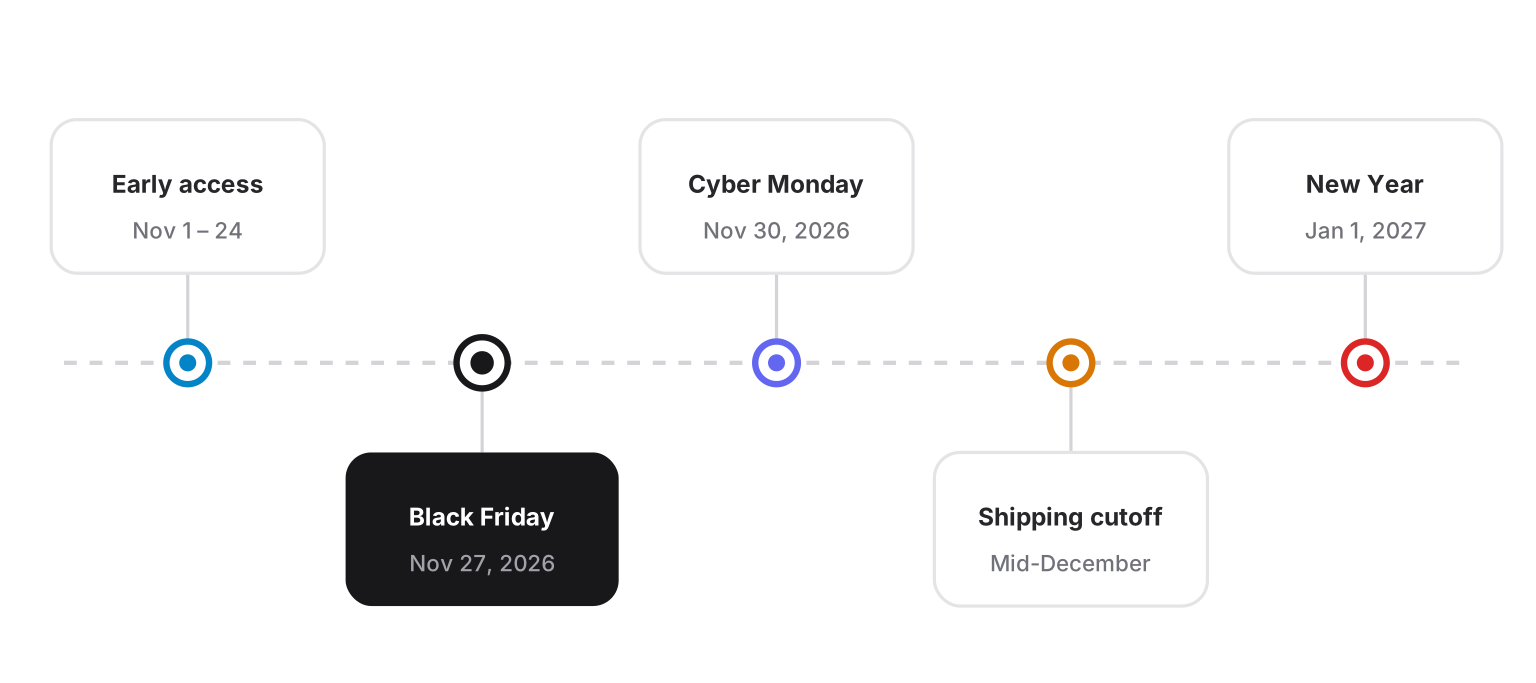
The season arc from early access to New Year. Each milestone is a natural countdown deadline — and each one ends for real.
| Moment | Date (2026) | What runs | Timer deadline |
|---|---|---|---|
| Halloween | Oct 31 | Themed one-day offers | End of Oct 31 |
| Early access | Nov 1–24 | VIP or subscriber-only previews | Your chosen access window |
| Black Friday | Nov 27 | Main event, deepest offers | End of Nov 27 |
| Cyber Monday | Nov 30 | Online-only continuation | End of Nov 30 |
| Giving Tuesday | Dec 1 | Charity and match campaigns | End of Dec 1 |
| Shipping cutoffs | Mid-December | Last-days-to-order reminders, gift deadlines | Your carrier's actual cutoff |
| New Year | Jan 1 | Clearance and "new year" resets | End of your clearance window |
Two rows in that table deserve emphasis. Shipping cutoffs are the most underused honest deadline in ecommerce — more on that below. And early access rewards the subscribers who opened your last ten emails, which is where repeat purchases come from, not just the discount hunters who appear in November.
Black Friday and Cyber Monday are the season's main events, and they deserve a plan of their own — see the dedicated Black Friday email countdown timer guide for the full 2026 send sequence, the Cyber Monday timer switch, and copy-ready templates.
Plan Backwards from Delivery Deadlines
Most holiday planning starts from the launch date. It works better in reverse: start from the last day a customer can realistically order and receive their package, then build the campaign backwards.
- Find your real last-order dates. Ask your carriers (or check your fulfilment capacity) for the last ship dates by service level: standard, expedited, express.
- Make each cutoff a campaign. "Order by Dec 18 for delivery before the holidays" is a complete, honest, self-explaining offer — and the timer for it ends on time, every time.
- Stack the reminders. A cutoff deserves three touches: a heads-up a few days out, a "last day for standard shipping" email, and a final-hours email for expedited options.
A shipping-cutoff countdown is also the rare timer that helps the customer rather than pressuring them. Missing it doesn't cost a discount — it costs a gift arriving late. That is urgency in the reader's interest, and readers can tell the difference.
The Holiday Email Sequence
One timer can carry a whole sequence. Create a single countdown to your campaign deadline, embed the same timer in every send, and let the emails escalate around it:
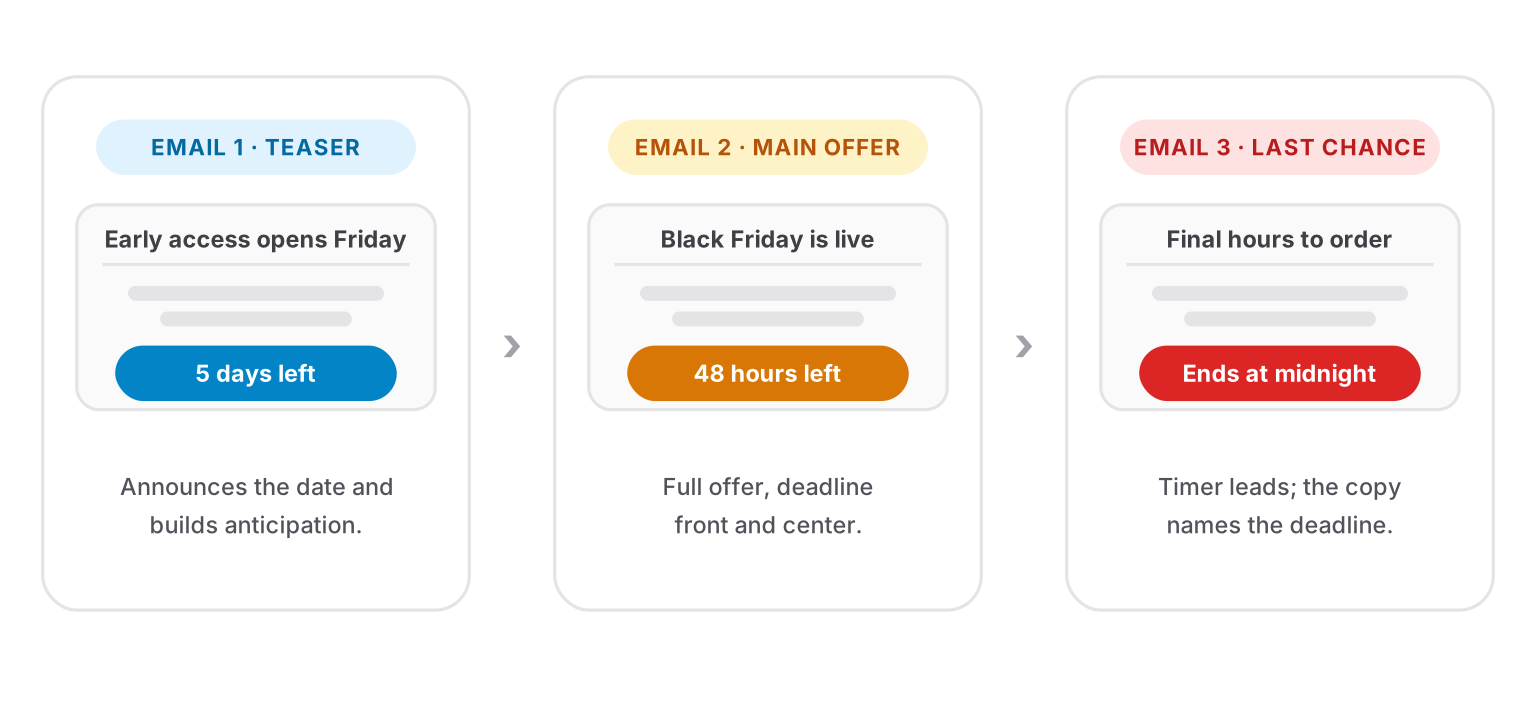
Same timer, three jobs: announce the deadline, show the offer against it, and count the final hours.
| Timing | Role of the timer | |
|---|---|---|
| Teaser | 1–2 weeks before | Shows the deadline approaching; builds anticipation for early access |
| Main offer | Launch day | Sits next to the primary CTA; the deadline frames the discount |
| Reminder | Midway | Shows time draining; answers "what's in it for me" with benefits |
| Last chance | Final day or hours | Timer near the top; copy names the exact end time |
| After zero | Post-deadline | Timer is expired — see below |
That last row matters. Holiday lists get opened late — on planes, between commitments, days after sending. Decide in advance what a late opener sees: an expired state, or a redirect to whatever is still live. A timer frozen at 00:00:00 under a "hurry!" headline is the worst possible outcome, because it tells the reader your urgency was never real. Countdown Builder handles this with expiry settings — an expired message, image, or zeros — and an expiry URL, so a click on a finished Black Friday timer can land on the Cyber Monday page instead of a dead link.
Where to Place Holiday Countdown Timers
Website homepage. The holiday offer belongs above the fold with its deadline visible. A countdown banner makes the season's main campaign impossible to miss.
Product and cart pages. This is where shipping cutoffs earn their keep. A "order within 07:42:10 for on-time holiday delivery" timer beside the add-to-cart button converts a policy into a reason to finish now.
Email. Place the timer next to the primary CTA, with the deadline also stated in text — some subscribers block images, and a line like "Offer ends Friday, Nov 27 at 11:59 PM" survives without them. Our website countdown timer guide covers the site side; the email side follows the same rules.
One timer per asset. A homepage with three different clocks counting to three different deadlines communicates nothing except confusion. If you run overlapping offers, each page or email promotes one deadline.
Holiday Copy That Works with a Timer
The timer shows the time; the copy has to say what the time is for. Subject lines and preheaders that name the real moment:
- Black Friday ends tonight at midnight
- Order by Thursday for on-time delivery
- Early access opens Friday — 48 hours before everyone else
- Final hours: Cyber Monday pricing
- Your gift card deadline is Sunday
- 3 days left to lock in 2026 pricing
- Last call for standard shipping
Preheaders should add the detail the subject line implies: "The countdown is on — doors close at 11:59 PM," or "After Friday, on-time delivery is no longer guaranteed."
Inside the email, keep the copy around the timer short. One setup line above it — "Black Friday pricing ends in:" — then the timer, then the CTA. The timer is not a paragraph illustration; it is the argument.
Design Tips for Holiday Timers
- Go festive, but keep contrast. Red, green, gold, and snow-white palettes are fine — as long as the digits stay high-contrast and legible on the smallest screen your readers use.
- Match the campaign, not just the season. A black-and-white Cyber Monday timer reads sharper than a third red-and-green design in the same inbox.
- Design for mobile first. Most holiday opens happen on phones, often one-handed and distracted. Test that the timer reads clearly at email width on a small screen.
- Skip the noise around it. Falling snow, blinking borders, and a ticking clock all at once is over-decoration. The clock is already the motion; let it move alone.
- State the deadline in text too. Alt text and a plain-text deadline line keep the email honest when images don't load.
How to Set Up a Holiday Countdown Timer
We make Countdown Builder — this blog is published by the company — so here is the setup in our own tool, in four steps:
- Create the timer and set the real deadline: end of Black Friday, your shipping cutoff, the end of your clearance window — the actual moment the offer dies.
- Pick a template and match your brand. There are 65+ templates to start from; adjust colors, fonts, and labels until the timer looks native to your campaign.
- Add urgency messages if the campaign is long. Thresholds like "48 hours left" and "Final hours" escalate the copy automatically as the deadline approaches — the full feature is on the urgency messages page.
- Make it clickable and set an expiry URL. Holiday traffic arrives late; send expired clicks to the next live offer instead of a finished page.
Then copy the HTML snippet and paste it into your email platform — the timer works anywhere custom HTML is accepted, and the same snippet can carry the whole sequence.
Keep Holiday Urgency Honest
The holidays tempt every brand into the same trap: extending the "final" deadline. Resist it.
- If the timer says midnight, it ends at midnight. A deadline that keeps moving teaches your list that none of your deadlines are real — including next year's.
- Match shipping claims to carrier reality. "Order by the 18th for on-time delivery" is only honest if your carrier delivers on that. Verify before you promise.
- Use real stock counts or none at all. Invented scarcity during the biggest shopping week of the year is the fastest way to lose a subscriber's trust permanently.
- Handle zero deliberately. Expired state, redirect, or the standing offer — never a frozen clock.
The upside of honesty is compounding: a list that learned your Black Friday timer really ended teaches itself to act on your timer next season.
FAQ
When should holiday campaigns start?
Early access and teaser campaigns typically run from late October through mid-November, with the main event concentrated in the Black Friday–Cyber Monday window. Start with your real deadlines — the shipping cutoffs — and plan backwards from those dates rather than forwards from today.
Do countdown timers work for gift and delivery campaigns?
Yes, and often better than for discount campaigns, because the deadline is external. A shipping-cutoff timer isn't urging anyone to hurry for the brand's sake — it's telling them the last moment their order arrives in time. That's service, not pressure.
Can I reuse one timer across multiple emails?
Yes. Create one countdown to the campaign deadline and embed the same snippet in every send. Every email then shows the same remaining time, and you update the deadline in one place if anything changes.
What happens when the timer reaches zero?
Whatever you configure: an expired message or image, zeros, or a redirect via an expiry URL to the next live offer. The one thing a timer should never do is freeze at 00:00:00 under copy that still says "hurry."
Final Thoughts
Holiday campaigns don't need manufactured urgency — the season supplies the deadlines, and the deadlines are real. Countdown timers make those deadlines visible: on the homepage, beside the cart, and next to the CTA in every send of the sequence. Map the season, plan backwards from your shipping cutoffs, run one timer per campaign, and handle the moment after zero with as much care as the moment before it.
If you want to try it, you can create a free timer — the free plan needs no credit card and adds no watermark.
Related Guides
- How to Increase Email Urgency with Countdown Timers and End-Time Messages
- Product Promotion Email Template with Countdown Timer
- The Psychology of Scarcity: Why Countdown Timers Actually Increase Sales
- How to Boost Flash Sale Conversions with an Email Countdown Timer
- Website Countdown Timer: Engage Visitors and Boost Conversions
Last updated: October 2026. Features described reflect Countdown Builder at the time of publication and can change — see the pricing page for current plans.
Written by Mehedi Hasan
Writer & Developer. He writes about email marketing, countdown timers, and campaign design.
Connect on LinkedIn