
Back-to-School Countdown Emails: The 2027 Playbook
 By Mehedi Hasan
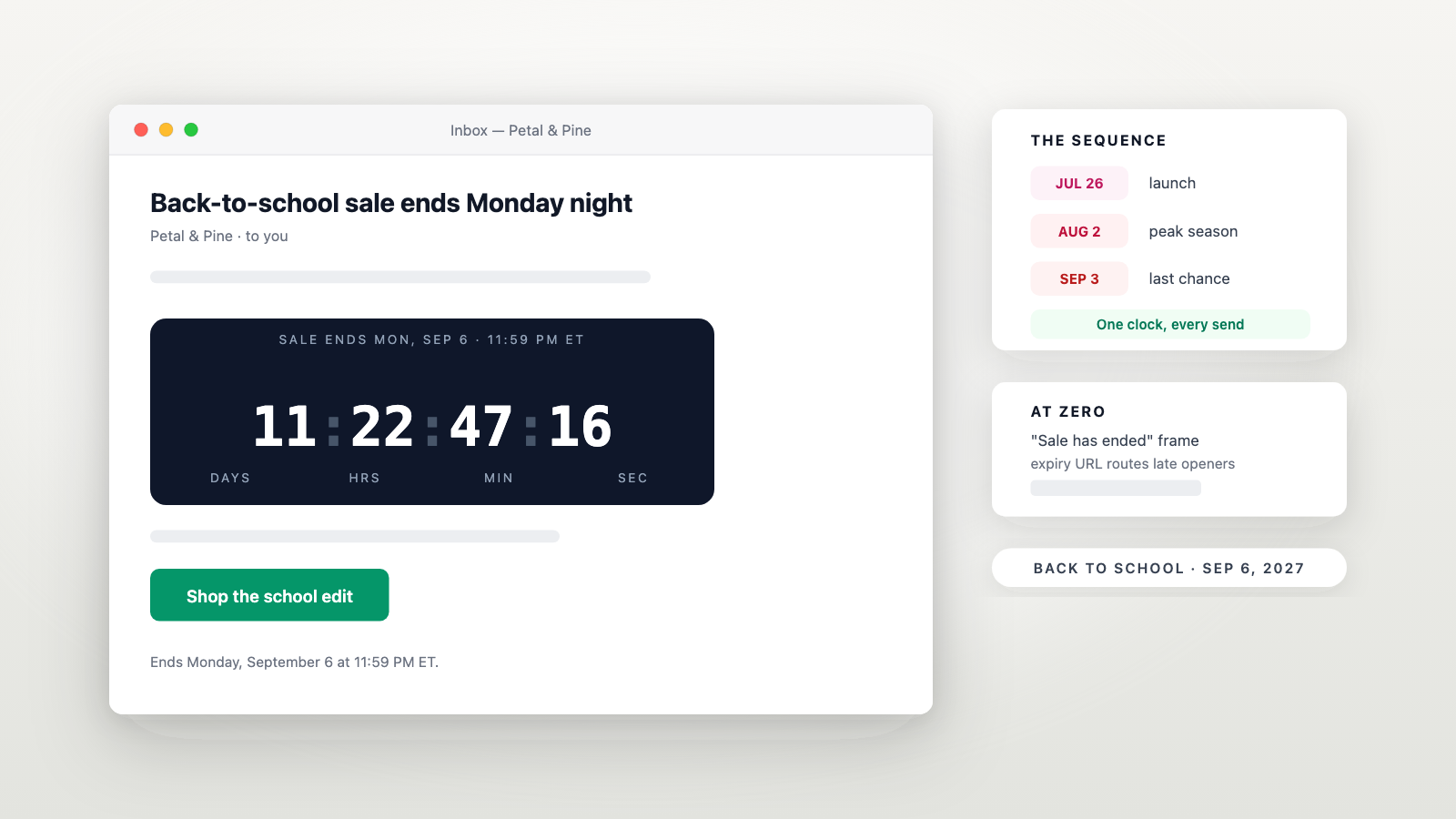
Short answer: a back-to-school countdown email is a seasonal offer email with a live clock counting to a deadline you set — and in 2027 the natural close is Labor Day, Monday, September 6. Unlike the fixed-date holidays, this season has no single date: build one timer for the sale close, one for each ship-by cutoff, and state both deadlines in words.
Back-to-school is the biggest selling window between Mother's Day and BFCM — supplies, apparel, shoes, electronics, dorm gear, and the classroom restock. It is also the longest seasonal campaign most stores run: ten-plus weeks from a late-July launch to a September close, which is more runway than the entire BFCM weekend gets.
That length is why the season needs a countdown in the first place. Easter points at March 28 and Mother's Day at May 9 — dates every reader can verify on a calendar. Back-to-school has no equivalent: a district's first day, a campus move-in, and a teacher's prep week are all different dates, and none of them is printed on a national calendar. The season's deadline is a decision, not a date — yours to define, publish, and honor.
Handled well, that is an advantage. A fixed holiday borrows credibility from the calendar; a self-set deadline earns it through consistency — the same close shown in every send, counted down honestly, and enforced for real. This guide covers the 2027 dates, the email sequence, how one timer serves the whole season, subject lines, copy-ready templates, and setup. The mechanics follow the same playbook as the Black Friday countdown timer guide — same timer, same embed; a longer window and a deadline you define.
Why Countdown Timers Fit Back-to-School
- The deadline is yours — and publishing it makes it real. Fixed holidays inherit urgency from the calendar; here the timer is what makes the deadline visible and believable. A clock that visibly reaches zero on the promised night teaches your list that your deadlines mean something — which is exactly the trust the next season's campaign inherits.
- The selection clock is the honest scarcity. A promo code stays valid until the deadline; a size run doesn't. Uniform sizes, dorm essentials, and the season's must-have styles thin out weeks before any close date. A countdown beside "sizes are going first" matches reality in a way a generic urgency badge never does.
- Different shoppers face different deadlines. K-12 parents shop against their district's first day, college families against move-in day, teachers against the week the classroom fills. If you know the date your reader is shopping against — segmented lists, a campus-store audience — a timer counting to that date is the most relevant clock you can send.
- A long window needs a spine. Ten weeks is too long for "act now" to carry on its own. One consistent deadline, shown in every send from launch to close, is what keeps the season's urgency honest in July and credible in September.
The 2027 Dates to Plan Around
| Date | Day | What it is |
|---|---|---|
| Mon, Jul 26 | Pre-season launch window | The back-to-school shop or early-bird offer goes live (timing is yours) |
| Mon, Aug 2 | Peak selection window | The widest assortment of the season — sizes and styles at their fullest |
| Mon, Aug 16 – Mon, Aug 23 | Order-by window for early-start districts | Set by your carrier and the start dates your customers face |
| Mon, Aug 23 | Two weeks to Labor Day | The exact fourteen-day marker send |
| Fri, Sep 3 | Labor Day weekend send day | The last-chance push — the final weekend before the close |
| Mon, Sep 6 | Labor Day (US) | The traditional back-to-school close — the date the campaign points at |
| Tue, Sep 7 | Day after | The natural wrap or clearance day |
Three notes on this calendar:
- Labor Day is a convention, not a command. The first Monday of September is when back-to-school promotions traditionally close, but your offer can end Saturday night, run through Monday at 11:59 PM, or roll into a Tuesday clearance. Pick the cutoff your store will actually enforce; the timer counts to that moment, and the copy states it.
- School dates are yours to know — or not claim. Districts set their own first days and colleges set their own move-in windows; there is no national back-to-school date to count to. If you serve a list whose dates you genuinely know, count to them. If you don't, count to your close — a timer pointed at a guessed school day is a fabricated deadline.
- Other markets run on their own calendars. In the UK and elsewhere, school return dates are set locally and the season's rhythm differs — anchor the close to your own promotion calendar in each region rather than importing the US Labor Day framing.
The Back-to-School Email Sequence
Five scheduled sends carry the season; automated flows run underneath.
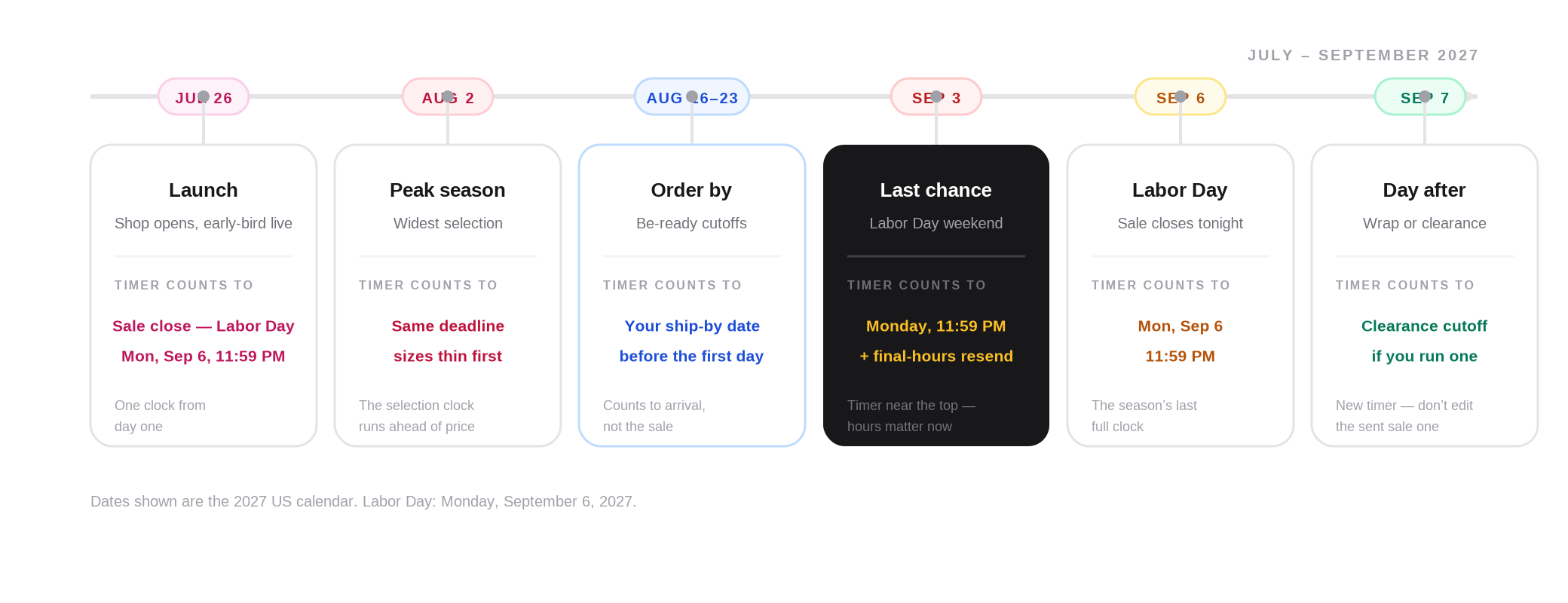
| When | What the timer counts to | |
|---|---|---|
| Launch | Mon, Jul 26 | The sale close — Labor Day, from day one |
| Peak selection | Mon, Aug 2 | The same close — a constant deadline, a selection message |
| Order-by reminder | Mon, Aug 16–23 | Your ship-by cutoff — the be-ready deadline |
| Two weeks left | Mon, Aug 23 | The close — exactly fourteen days out |
| Last chance | Fri, Sep 3 | Ends Monday at 11:59 PM — hours matter now |
| Labor Day close | Mon, Sep 6 | 11:59 PM — the season's final clock |
| Cart & browse recovery | All window, automated | Each subscriber's own short window |
Three details make the sequence work:
- Two clocks, honestly labeled. The price clock counts to your close; the be-ready clock counts to your ship-by cutoff for readers whose school starts before Labor Day. Those are different deadlines, and each gets its own timer with its own plain label: "Order by Fri, Aug 27 for delivery before the first day" versus "Sale ends Mon, Sep 6 at 11:59 PM." One clock doing both jobs is how a timer ends up publicly disagreeing with its own copy. The mechanics are the same ones that make a flash sale countdown timer work — short windows, one deadline, no ambiguity. For the be-ready clock, the shipping cutoff countdown playbook shows how a carrier's send-by date becomes the order-by time printed on the timer.
- The selection send is unique to this season. In BFCM the code expires at the deadline; in back-to-school the assortment usually expires first. A mid-August send with the same Labor Day timer plus "sizes are going first" is the most truthful urgency email of the season — the clock shows the close, the words show the stock.
- The Labor Day weekend send is the final-48-hours moment. The last-chance email examples show how final-hours layouts carry a close without hype — timer near the top, deadline in the words, one job per clock.
One Timer, Every Send
The reuse rule every seasonal playbook relies on holds double here, because the season is long: build one timer for the offer, paste the same embed into every send. A countdown timer for email is a live image, regenerated with the correct time remaining on every open — so the subscriber who opens the July 26 launch on September 3 sees days left, not a stale "ten weeks." One URL also means one deadline everywhere: email, the website countdown timer on the sale landing page, and exit pop-up all agree for ten straight weeks.
Three setup notes that matter more in a season this long:
- State the deadline in words too. "Ends Monday, September 6 at 11:59 PM" beside the clock survives blocked images and documents the real cutoff. For the order-by timer, the words carry the specifics: the cutoff day, time, and timezone, with what the deadline buys ("for delivery before the first day") attached.
- Set the expiry state before the first send. A ten-week season guarantees post-close openers — archived school-supply lists, forwarded dorm checklists, late shoppers in mid-September. Configure what a spent timer shows: frozen zeros, a short "sale has ended" frame, or an expiry URL routing to your next-best page. The options are in the expiry settings.
- Apple Mail readers are already handled. The timer regenerates on open, so Mail Privacy Protection does not break it — the MPP modes cover the fallback options. Outlook's Windows desktop client shows a still frame of the current time remaining, so pick a template whose frozen frame reads cleanly.
Building the Back-to-School Timer in Countdown Builder
The setup takes minutes:
Step 1: Pick the real cutoffs and set them
Start from policy, not the timer: what moment does checkout actually enforce, and what ship date can your carrier actually meet for the districts that start earliest? Set the offer timer to the sale close and — if you run delivery promises — a second timer to the order-by cutoff. Build in the timezone your audience shops in; the timer counts to the timezone configured with it, not each reader's local midnight. The localization settings cover the options.
Step 2: Pick a template that fits the season
Countdown Builder includes 65+ templates. Bold, high-contrast designs fit the season's energy — but legibility wins over theming: check that the digits still read at phone width and that the frozen first frame survives Outlook's still-frame rendering. The template guide covers the range, and custom labels let you set phrasing like "Sale ends in" or "Order by" instead of a generic default.
Step 3: Make the image clickable
The biggest element in the email should land on the back-to-school collection, not the homepage. Enable Clickable countdown image in the editor and point it at the season's landing page.
Step 4: Configure expiry before launch
Decide now what September 7-and-later openers see — zeros, an ended frame, or a redirect to your fall page. In a season with this much archived, re-opened mail, the expiry state is not an edge case; it is the most-opened version of your timer by October.
Step 5: Copy the embed into your ESP
The snippet is an image plus a line of HTML — no JavaScript — so it pastes into any platform that accepts an image or HTML block, and works anywhere images load. Then repeat for the second timer if you run the order-by cutoff or a day-after clearance.
Subject Lines for Back-to-School Countdown Emails
The subject carries the deadline in words; the timer carries it visually. Each line is true only if the timer agrees.
- The back-to-school shop is open — sale runs through Labor Day
- Sizes are going first: the season's widest week is now
- Order by Friday — gear before the first day
- Two weeks of summer left, and the sale ends with it
- Labor Day weekend: last call on back-to-school prices
- The sale ends Monday night — this is the last weekend
- Still shopping? Order today and it arrives before school does
- Your cart still has back-to-school pricing in it
Preheaders that add detail instead of repeating the subject:
- The timer in this email is counting to the real cutoff.
- Sale ends Monday, September 6 at 11:59 PM timezone.
- After Friday, on-time arrival moves to express rates.
- Sizes and styles are thinnest now — the deadline is Monday.
Copy-Ready Back-to-School Templates
Three skeletons to adapt. Keep copy around the timer short — the clock does the urgency work.
Launch (Mon, Jul 26)
Subject: The back-to-school shop is open — through Labor Day
Preheader: One deadline, one sale — it ends Monday, September 6.

Hi [First Name],

The back-to-school shop is live. Everything in the sale runs
through Labor Day — Monday, September 6 at 11:59 PM [timezone] —
and right now the selection is at its fullest.

[Countdown timer — set to the September 6 close]

Shop the school edit: [CTA]
Order-by / two weeks (Mon, Aug 23)
Subject: Two weeks of summer left — order by Friday
Preheader: After Friday, on-time arrival moves to express rates.

Hi [First Name],

School dates vary, but your shipping clock doesn't: orders
placed by Friday, Aug 27 at [time] [timezone] arrive before
the weekend — ahead of most start dates.

[Countdown timer — set to your order-by cutoff]

The sale itself runs to Labor Day, Monday, September 6.
Get the list done early: [CTA]
Last chance (Fri, Sep 3)
Subject: Last call — the back-to-school sale ends Monday night
Preheader: After Monday at 11:59 PM, pricing goes back.

[First Name],

The back-to-school sale closes Monday, September 6 at
11:59 PM [timezone]. If something has been sitting in your
basket since July, this is the weekend to finish it.

[Countdown timer]

Sizes and styles are final-stock — what's there is what's left.

[CTA: Finish Before Monday]
Common Back-to-School Timer Mistakes
- Shipping last year's dates. Labor Day 2026 fell on September 7; 2027 lands on September 6 — a day earlier, easy to clone right past. Clone-and-edit campaigns are how wrong dates survive year to year: rebuild from a dated template rather than editing last summer's files in place.
- Counting to a school date you invented. There is no national first day of school. A timer pointed at a guessed "back to school day" is a fabricated deadline — and it is visibly wrong to every reader whose district starts on a different date. Count to your close unless you know the reader's date for certain.
- One timer doing two jobs. "Order by Friday" copy over a clock counting to Monday midnight publicly disagrees with itself for days. Each deadline gets its own timer and its own label.
- Letting the clock outlive the stock. If the size run is gone by mid-August but the timer says two weeks remain, the email disagrees with the store. Run the selection send early, say the stock reality in words, and let the clock carry only the close.
- Timezone drift. A timer built in UTC under copy that says 11:59 PM ET will publicly disagree with itself for part of your list. Build in the audience's timezone and match the words to it.
FAQ
When should I start sending back-to-school emails?
Launch in late July — Monday, July 26, 2027 is a natural opening. Peak selection messaging in early August, the order-by window from August 16 to 23, the two-week marker on August 23, and the last-chance push over Labor Day weekend, closing Monday, September 6 at 11:59 PM. Cart and browse flows run underneath the whole season.
When is Labor Day 2027?
Monday, September 6, 2027 — the first Monday of September, and the traditional close of the US back-to-school season. In 2028 it moves to Monday, September 4, which is why the season's dates get verified fresh each year rather than cloned.
Should the timer count to school starting or to the sale close?
To whichever deadline the send is about — and label it. Only count to a school date you actually know for that reader, because districts and colleges set their own calendars. When you don't know the date, the sale close is the honest deadline.
What about college and campus audiences?
Move-in dates are set by each campus, and they scatter across August. If you capture those dates — a campus store, a first-year signup flow — a timer counting to the reader's own move-in day is the most relevant clock email can offer. Otherwise, count to your close and let the copy acknowledge the range.
Do countdown timers work in every email client?
They work anywhere images load, because the timer is an animated image with no JavaScript — Gmail, Apple Mail, Outlook on the web and Mac all play it, and it regenerates on every open. Outlook's Windows desktop client shows a still frame of the current time remaining, which is why the frozen frame should be legible.
Is there a free countdown timer for back-to-school emails?
Yes — the Countdown Builder free plan has no watermark and requires no credit card, with 65+ templates to start from. Paid plans add unlimited timers and views if a ten-week season with multiple segments outgrows the free tier.
Final Thoughts
Back-to-school rewards the discipline every seasonal campaign needs — one real deadline, shown consistently, ended honestly — and it adds a twist the fixed-date holidays don't have: the deadline is yours to create. Pick the close, publish it early, give the order-by cutoff its own labeled clock, state both deadlines in words beside them, and let the timers expire for real. A list that watched your clock hit zero exactly when you said it would is the season's second product — and the reason they'll open the next campaign.
You can create a free email countdown timer and have the embed ready well before the late-July launch window. Current plan details are on the pricing page.
Related Guides
- Black Friday Email Countdown Timer: The 2026 BFCM Playbook
- Countdown Timers for Holiday Campaigns: A Practical Guide
- How to Boost Flash Sale Conversions with an Email Countdown Timer
- Last-Chance Emails: Annotated Examples + the Final-Hours Sequence
- Website Countdown Timer: Engage Visitors and Boost Conversions
Last updated: November 2026. Dates follow the 2027 calendar — Labor Day falls on Monday, September 6, 2027. Product features reflect Countdown Builder at the time of updating and can change — see the pricing page for current plans.
Written by Mehedi Hasan
Writer & Developer. He writes about email marketing, countdown timers, and campaign design.
Connect on LinkedIn