
Shipping Cutoff Countdown Emails: The Order-By Playbook
 By Mehedi Hasan
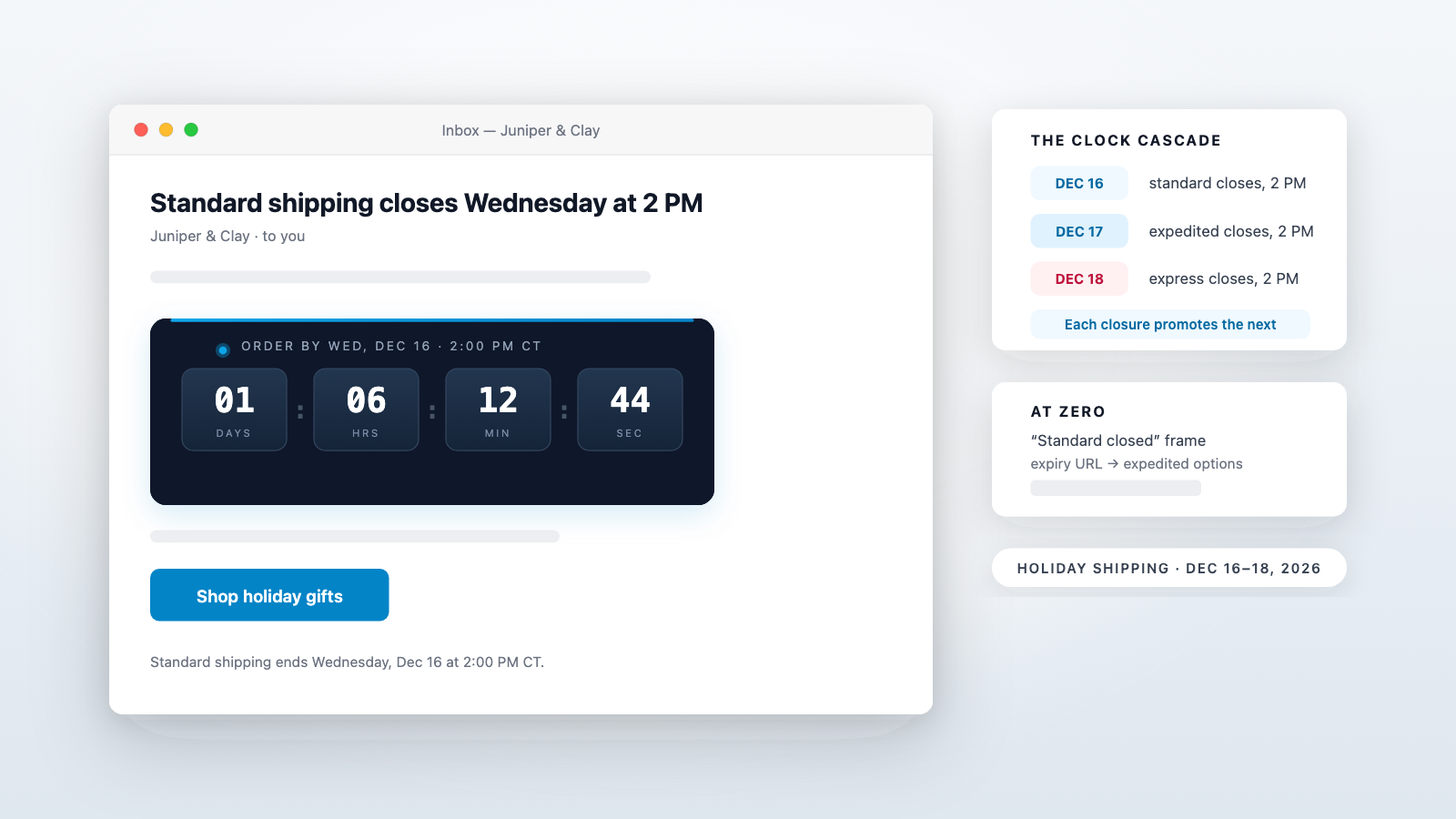
Short answer: a shipping cutoff countdown email counts to the last minute a customer can order and still receive the parcel before the holiday — your order-by time, not the carrier's send-by date. Build one timer per shipping service, name the service in the copy, and let each clock hand off to the next faster one when it reaches zero.
December 25, 2026 falls on a Friday, and every parcel that needs to arrive before it has a last day to enter the mail. The U.S. Postal Service has published its 2026 dates: for the contiguous United States, Thursday, December 17 for Ground Advantage and First-Class Mail, Friday, December 18 for Priority Mail, and Saturday, December 19 for Priority Mail Express — recommended send-by dates for expected delivery before December 25.
That makes shipping cutoffs a deadline no brand has to invent, and the only one where the countdown works for the reader. A sale timer asks someone to hurry for the brand's sake. An order-by timer tells them the last moment their parcel still arrives in time — missing it costs a late gift, not a discount.
This guide is the deep dive our holiday campaign guide keeps pointing at: how a carrier's send-by date becomes a customer's order-by minute, why a shipping deadline is really three deadlines in a row, the send sequence, and the build steps for an email countdown timer that earns its place in the inbox.
Why Shipping Cutoffs Reward Real Deadlines
- The deadline is external. The carrier publishes it weeks in advance, and it passes whether or not your customer was paying attention. Urgency you invent has to be defended; urgency the mail schedule sets defends itself.
- It is the rare timer that serves the reader. Missing a sale costs a discount. Missing a shipping cutoff costs a gift arriving late. An order-by clock is a service notice with a deadline attached, and readers can tell the difference.
- It is really three deadlines in a row. Standard service closes first, then expedited, then express — each one a separate, honestly labeled clock that takes over when the one before it expires.
- The same structure returns every gift season. The Mother's Day playbook, the back-to-school playbook, and the December holidays all run on a delivery date minus transit time. Set the method once, and each season is a matter of new dates.
What Should a Shipping Cutoff Countdown Count To?
Your order-by minute — for each service you offer. That is usually three clocks, each serving customers at a different stage of delay:
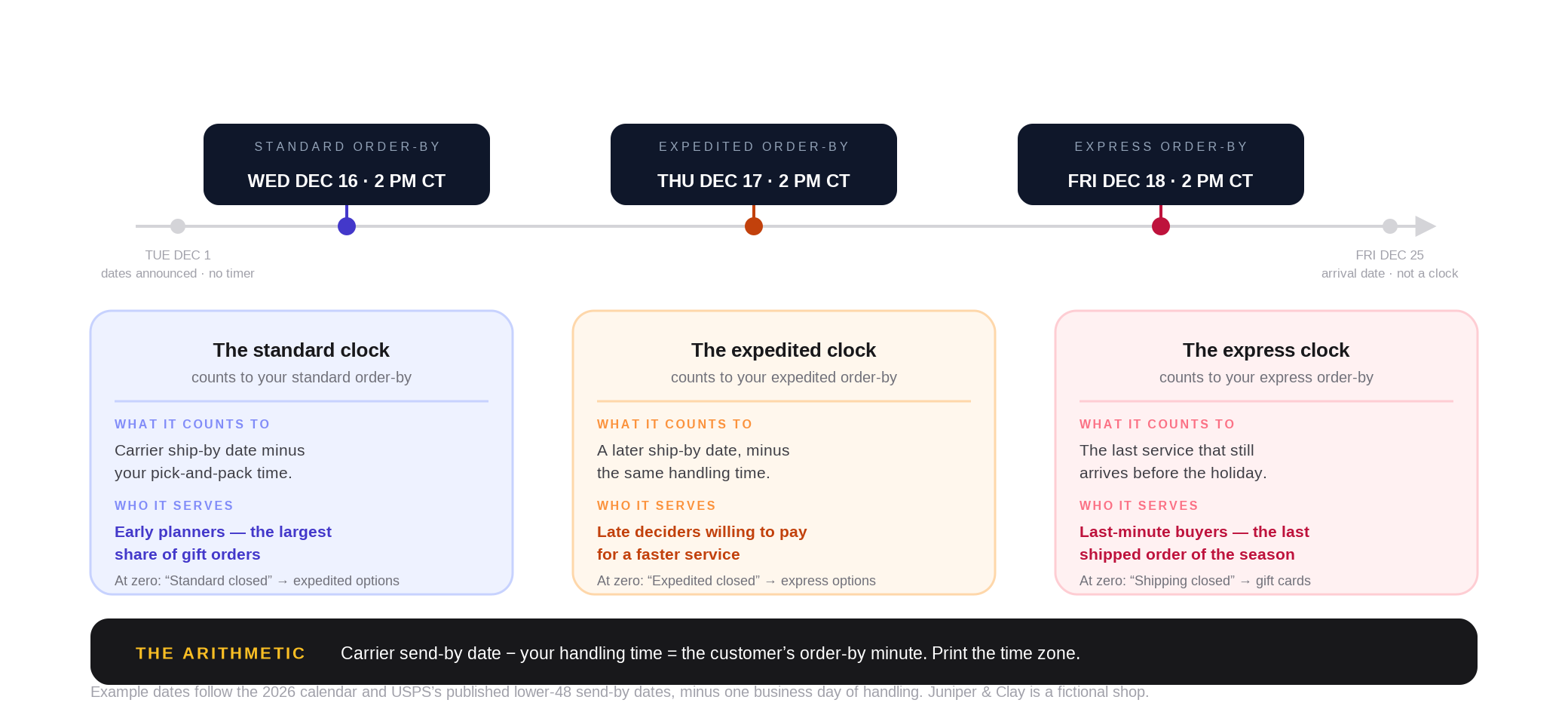
Three shipping services, three separately built timers, each handing off to the next at zero. The arrival date itself is not one of the clocks.
Here's a fictional example we'll use throughout — Juniper & Clay, a small homewares shop that ships from one warehouse in Kansas City, Central Time. It needs one business day to pick and pack, and it hands parcels to the Postal Service at 2:00 PM CT. The carrier's send-by dates below are the real 2026 ones; the handling time is the shop's own.
The standard clock — counts to the standard order-by minute
Standard service is the cheapest option and the first to close. For the lower 48, the Postal Service's send-by date is Thursday, December 17 — the day the parcel must be in the mail. Juniper & Clay subtracts a business day for pick-and-pack, so its customers must order by Wednesday, December 16, 2:00 PM CT. The timer counts to that minute, and the copy under it says so in plain words.
At zero, the timer flips to its expiry state — "Standard closed — expedited still delivers" — and its expiry URL sends late openers to the expedited options instead of a dead end. A closed shipping method is the one deadline where the business still has a way to serve the person who missed it.
The expedited clock — counts to the expedited order-by minute
Priority Mail's send-by date is a day later, Friday, December 18, which puts the shop's expedited order-by at Thursday, December 17, 2:00 PM CT. This clock goes out the afternoon standard closes, when it becomes the best option left. At zero it flips to "Expedited closed — express still delivers" and routes to the express options.
The express clock — counts to the express order-by minute
Priority Mail Express has the last published send-by date before the holiday — Saturday, December 19 — so the shop's final order-by is Friday, December 18, 2:00 PM CT. At zero it flips to "Shipping closed — send a gift card" and routes to whatever can still arrive on time: a digital gift card, a gift certificate, a donation made in someone's name. The last clock in the sequence has no faster service behind it, so its expiry state points somewhere that still works.
The Carrier's Date Is Not Your Deadline
The most common shipping-cutoff mistake is printing the carrier's send-by date as the customer's order-by date. They are different minutes. The carrier's date is when the parcel must be handed over; the customer's deadline is that date minus however long your operation needs to pick, pack, and stage the order.
| Service | USPS send-by date, 2026 (lower 48) | Juniper & Clay's handling | Customer's order-by |
|---|---|---|---|
| Ground Advantage / First-Class Mail | Thu, Dec 17 | − 1 business day | Wed, Dec 16, 2:00 PM CT |
| Priority Mail | Fri, Dec 18 | − 1 business day | Thu, Dec 17, 2:00 PM CT |
| Priority Mail Express | Sat, Dec 19 | − 1 business day | Fri, Dec 18, 2:00 PM CT |
Four steps set your own numbers:
- Take the send-by date from the carrier you actually use. The Postal Service publishes its holiday dates each year on one page. Private carriers such as UPS and FedEx publish their own schedules, and the dates differ by service — copy them from the carrier's own holiday page, not from a roundup or from memory.
- Subtract your handling time. However long an order sits before it leaves your building — one business day for the example shop, more in a busy week. A shop that prints the carrier's date and then misses its own handoff has broken a promise the timer made all week.
- Decide whether to add a buffer. The Postal Service calls its dates "recommended send-by dates for expected delivery before December 25" and notes that the actual delivery date may vary. A day of slack is cheap insurance against your own backlog.
- Print the result with a time and a time zone. "Order by Wednesday, Dec 16 at 2:00 PM CT" is a complete deadline. "Order by Dec 16" leaves the reader guessing until midnight — ten hours after the warehouse stopped taking orders.
Two limits on the table above. The dates are for the contiguous United States: the Postal Service lists earlier send-by dates for international addresses (December 9 and December 16, depending on service) and says Ground Advantage to Alaska, Hawaii, Puerto Rico, and the territories needs a ZIP-to-ZIP lookup, because transit runs ten days or more. And the handling column is the shop's, not the carrier's — yours will differ. Dates change every year, so check the carrier's current page before publishing any of them.
Which Send Gets Which Clock?
| Sent | Timer counts to | |
|---|---|---|
| Holiday shipping dates | Tue, Dec 1 | (no timer — see note below) |
| Standard closes in a week | Thu, Dec 10 | Standard order-by — Wed, Dec 16, 2:00 PM CT |
| Standard closes Wednesday | Tue, Dec 15 | Same clock |
| Last morning for standard | Wed, Dec 16, morning | Same clock, final hours |
| Standard closed — expedited still delivers | Wed, Dec 16, afternoon | Expedited order-by — Thu, Dec 17, 2:00 PM CT |
| Expedited closed — express still delivers | Thu, Dec 17, afternoon | Express order-by — Fri, Dec 18, 2:00 PM CT |
| Too late to ship | Sat, Dec 19 | (no timer) |
Three notes on the shape of that sequence:
- The dates announcement runs without a timer. It is a service notice carrying all three deadlines in a table — there is no single minute for one clock to count to, and three timers in one email compete with each other. Each deadline gets its clock in the email that owns it, the same rule our teaser-clock guide sets for announcements.
- Every closure promotes the next service. The standard clock expires Wednesday afternoon, and the email that follows carries the expedited clock already running. Delivered emails can't be edited, so Tuesday's send keeps its Wednesday minute forever — the Wednesday-afternoon email is where late openers are told what still works.
- The last send has no clock. Once express closes there is no shipping deadline left to count to. "Send a gift card" is an offer with no cutoff, and a timer on it would be a costume — the same rule our last-chance guide applies to "final hours" copy. The sequence ends with an honest stop, not an invented extension.
Honesty Rules Specific to Shipping Deadlines
- Say "expected," never "guaranteed." The Postal Service publishes recommended send-by dates for expected delivery and states that the actual date may vary. "Order by Dec 16 for delivery before December 25" repeats the carrier's own framing; "guaranteed by Christmas" is a promise nobody in the chain has made.
- Don't borrow another lane's cutoff. A date verified for ground shipping to the lower 48 is not a date for Hawaii, for international addresses, or for a private carrier's express service. Where your list can be segmented by destination, send each segment its own deadline.
- One clock per service. A single "order soon" timer hides the structure that makes shipping cutoffs work: the customer who misses standard still has two options. Label each clock with the service it counts to.
- State the deadline in text in every email. "Standard shipping ends Wednesday, Dec 16 at 2:00 PM CT" under the timer survives blocked images and gives an AI inbox summary a text form of the deadline to carry — the rule our AI-inbox guide explains.
- The time zone is the warehouse's. The cutoff is one physical moment — the minute your team stops accepting orders — so the timer counts to the time zone it was built with, not each reader's local time. Your 2:00 PM CT is 12:00 PM in Los Angeles; a reader who waits for their own 2:00 PM is two hours late. Print "CT" beside the clock, or the number on it is wrong for everyone outside your zone.
- Never reopen a closed cutoff. If the standard clock has expired in a thousand inboxes, reopening standard "for one more day" contradicts every one of those expiry frames — the false-urgency problem our legality guide covers. If capacity changes, promote it as a new, separately dated offer with a new timer.
Building the Timers
- Build one timer per service. Sent emails can't be edited, so each embed keeps counting to the minute it was built with, forever. The standard clock can't be repurposed into the expedited clock on Wednesday afternoon; three services means three timers, each retiring at its own zero.
- Set each deadline to your order-by minute, in your warehouse's time zone. You set the end date, time, and time zone when you build the timer — use the minute checkout actually stops accepting orders for that service, and the zone your warehouse works in.
- Name the service on and around the clock. The custom labels rename the unit labels — "Days to order" instead of a bare "Days" — and the sentence beneath the timer carries the specifics: service, date, time, and time zone. High-contrast designs from the 65+ templates stay legible at phone width, where most of these emails are read.
- Make each timer clickable to the right page. With "Clickable countdown image" enabled, the countdown carries a link — point it at the page that explains the shipping options, never at a bare homepage. In the final hours the timer is the biggest element in the email.
- Configure the handoff before the first send. The expiry settings choose what each timer becomes at zero — custom text reading "Standard closed — expedited still delivers" — and, with the clickable image on, a separate expiry URL sends those clicks to the next service. The Wednesday-afternoon flip is the most-attended moment of the sequence, so it is configured before the first send, not at 1:55.
You can build the timers on Countdown Builder for nothing: the free plan costs $0, needs no credit card, and adds no watermark. It carries a view limit sized for small projects, though, and a cutoff sequence goes to your whole list seven times in under three weeks. Check the current limits before the first send — the pricing page lists unlimited views, clickable countdown images, and custom expiry text under its paid plans.
Subject Lines for the Sequence
The subject names the deadline; the timer shows it live.
- Dates announcement: Our holiday shipping dates — order by Dec 16 for standard
- One week out: Standard shipping closes Wednesday at 2 PM
- Two days out: Order by Wednesday — standard shipping ends at 2 PM
- Last morning: Standard closes at 2 PM today
- Handoff: Standard is closed — expedited still arrives by the holiday
- Final handoff: Last call for express — order by 2 PM Friday
- Gift cards: Too late to ship? Send a gift card instead
Common Mistakes
- Printing the carrier's date as the deadline. "Order by Dec 17" above a timer, when a parcel handed over on Dec 18 misses the send-by date: every order placed on the 17th is a late gift with your name on it.
- One "order soon" clock for every service. It hides the fact that standard closes first and express last, so the reader can't tell which deadline applies to them — and it expires once, for everything, days before it had to.
- "Guaranteed by Christmas." The carrier publishes expected-delivery dates, not promises. Repeat the carrier's framing, and a stormy December doesn't turn your email into a complaint.
- A clock without a time zone. "Ends at 2:00 PM" is two different minutes in Kansas City and Los Angeles. The letters "CT" are the difference between an order that ships and one that can't.
- Frozen zeros at the cutoff. The clock hits zero, standard is closed, and the image reads 00:00:00:00 with nowhere to go — no expiry text, no expiry URL, on the day the sequence existed to handle.
- Reopening a closed cutoff. Standard "extended one more day" after its clock expired in every inbox on the list: the reader who paid for express the night before finds out they didn't need to.
FAQ
What is a shipping cutoff countdown timer?
An email countdown timer that counts to the last minute a customer can order and still have the parcel arrive before a holiday. It is built from the carrier's send-by date minus the seller's handling time, and it is labeled with the shipping service it applies to.
What should a shipping cutoff timer count to?
Your own order-by minute for one shipping service — not the carrier's send-by date, and not the holiday itself. Offer three services and you build three timers, each handing off to the next faster one when it expires.
When is the last day to ship for Christmas 2026?
For expected delivery before December 25 in the contiguous United States, the Postal Service recommends sending by Thursday, December 17 for Ground Advantage and First-Class Mail, Friday, December 18 for Priority Mail, and Saturday, December 19 for Priority Mail Express. Earlier dates apply to international addresses and to Ground Advantage bound for Alaska, Hawaii, Puerto Rico, and the territories. Private carriers publish separate schedules.
Should I use the carrier's deadline or my own?
Your own. The carrier's date is when the parcel must be in the mail; your customer's deadline is that date minus your pick-and-pack time. Print the result with a time and a time zone.
What should the timer show after the cutoff passes?
A custom expiry message naming the next option that still works — "Standard closed — expedited still delivers" — with an expiry URL that sends clicks to that service. The last clock in the sequence points to whatever can still arrive on time, such as a gift card.
Do shipping cutoff timers work in email?
Yes. The timer is an image that regenerates each time the email is opened, so each open shows a live count in Gmail, Outlook, and Apple Mail. State the deadline in text beneath it for blocked images and AI inbox summaries, and expect a still frame in Outlook's classic Windows desktop client.
Can I say delivery is guaranteed if they order by the deadline?
No. The Postal Service calls its dates recommended send-by dates for expected delivery and notes that the actual date may vary. Copy that repeats "expected delivery before December 25" is accurate; "guaranteed" is a promise the carrier hasn't made.
When should the shipping-cutoff emails go out?
Announce all three dates around December 1 without a timer, start the standard clock about a week before it closes, send final-hours reminders the morning of each cutoff, and follow each closure with the next service's clock the same afternoon. After the last cutoff, send the no-shipping options without a timer.
Final Thoughts
A shipping cutoff is the most honest deadline in ecommerce: the carrier sets it, the calendar enforces it, and the customer benefits from knowing it. Turn each service's send-by date into your own order-by minute, build one labeled timer for each, and configure the handoff before the season starts. Readers who are told the truth about their last day to order are the ones who trust the next deadline you send.
You can create your shipping cutoff countdown timer in a few minutes — and put the same deadline on the shipping page of your site, where late shoppers go looking for it.
Related Guides
- Countdown Timers for Holiday Campaigns: A Practical Guide
- Mother's Day Email Countdown Timer: The 2027 Playbook
- Back-to-School Countdown Emails: The 2027 Playbook
- Last-Chance Emails: Annotated Examples + the Final-Hours Sequence
- Are Fake Countdown Timers Legal? False-Urgency Rules for Email Marketers
Last updated: November 2026. Carrier dates are the U.S. Postal Service's published 2026 send-by dates for the contiguous United States and change every year. Product features reflect Countdown Builder at the time of updating and can change — see the pricing page for current plans.
Written by Mehedi Hasan
Writer & Developer. He writes about email marketing, countdown timers, and campaign design.
Connect on LinkedIn