
Release Countdowns: Teaser Clocks for Launches, Drops, and Premieres
 By Mehedi Hasan
Short answer: a release countdown timer counts to a published reveal moment — a trailer, a premiere, a drop going live — and shows it across email, the site, and social. It works because the moment is real and public. Two rules keep it credible: zero must deliver what the clock implied, and a second timer takes over for the commercial window that follows the reveal.
No corner of marketing runs on countdowns harder than releases. Publishers stream a literal clock in the final hour before a trailer goes live; fan communities run their own timers to a launch minute years in the making; and entire retail categories — sneakers, collectibles, game pre-orders — schedule drops to the minute. As this piece publishes, Grand Theft Auto VI lands Thursday, Nov 19, 2026, closing one of the longest audience-countdown runs in entertainment history. The clock is the native grammar of a release.
This guide owns the teaser phase: everything between "something is coming" and the reveal moment. What happens after — pre-order windows, drop-day purchase windows, restock holds — is the scarcity-events playbook, and the two hand off to each other at zero.
Why Teaser Clocks Are Different from Sale Timers
A sale timer asks a buyer to act before a price expires. A teaser clock asks a spectator to show up at a moment. The differences shape every decision below:
- The audience hasn't been sold to yet. They're on a waitlist, a fan server, or a social follow — people who opted in to hear when, not how much. Teaser emails can be short and factual, like the alert emails in a drop campaign.
- The clock's product is attention, not urgency. Every send, page view, and social post pointing at the same deadline compounds the audience's readiness for one minute. The timer is the shared reference point everyone counts against.
- The deadline is an event, not a price. When a sale timer hits zero, the offer changed. When a teaser clock hits zero, something happens — or, catastrophically, doesn't. That's why teaser clocks carry an honesty burden sale timers never touch.
- The reveal minute is precise. Sales end at midnight; reveals happen at a named minute ("Thursday, 10:00 AM ET") because the event itself is scheduled to the minute. The timer should match that precision exactly.
The Three Phases of a Release Campaign
A release has three phases and two clocks, and confusing them is the classic failure:
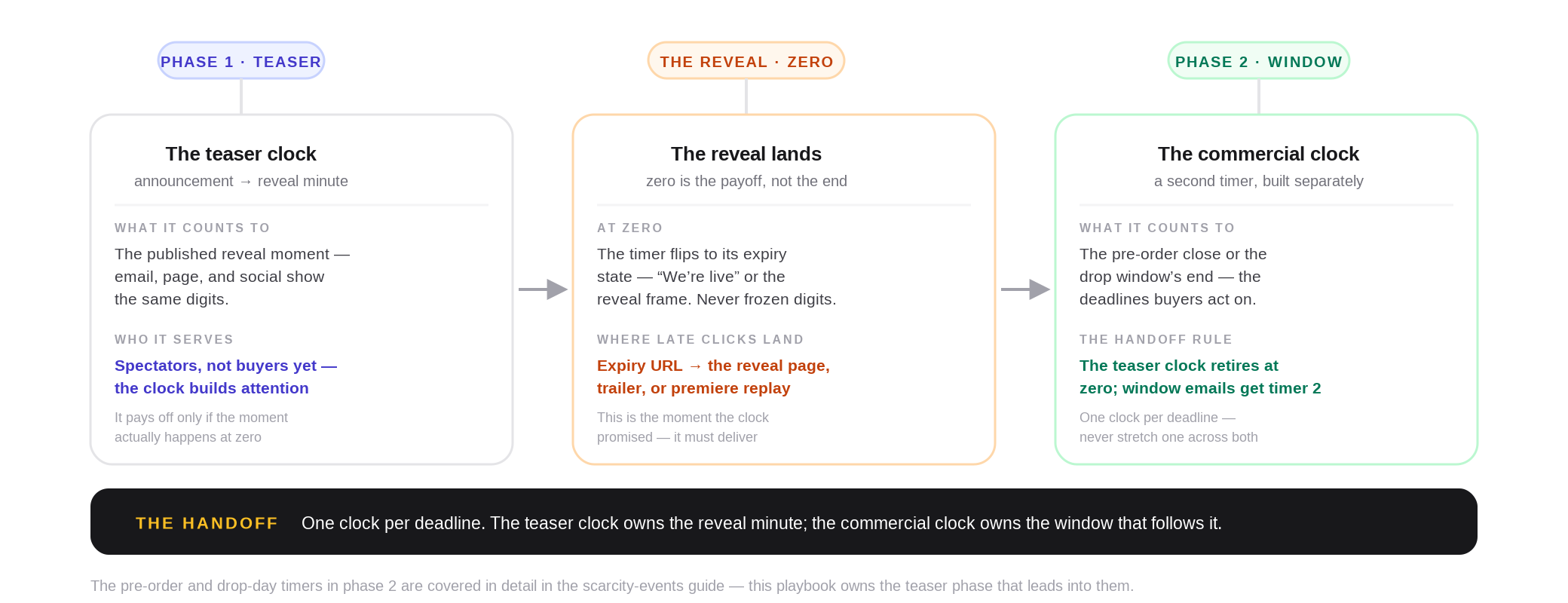
The teaser clock retires at the reveal; the commercial clock takes the window that follows. One clock per deadline.
- Phase 1 — the teaser. One timer counting to the published reveal minute, embedded in every teaser email and on the coming-soon or waitlist page, with the same digits echoed on social. The audience is counting with you.
- The reveal — zero is the payoff. The clock expires into its configured expiry state — "We're live," the reveal frame, the premiere replay — and its expiry URL lands late clickers on the reveal content. This is the moment the whole campaign promised; the configuration has to be set before any send.
- Phase 2 — the commercial window. Pre-orders open, or the drop window runs. These emails need a second, separate timer counting to the window close — the deadlines buyers act on. The mechanics from the scarcity-events guide take over from here.
What the Timer Counts To: the Reveal Minute
The teaser timer counts to one moment: the reveal, published in advance, in the timezone you stated it in. If the announcement says 10:00 AM ET, the timer ends 10:00 AM ET — set it in that zone when you build it, not converted by eye from your own clock; the timezone settings make the zone an explicit choice.
That minute is a commitment, and the whole entertainment industry's recent history proves both directions:
- When the minute is real, the countdown becomes the campaign. Trailer premieres stream a countdown in their final hour; platform showcases publish their windows weeks ahead (CES 2027 runs Wed Jan 6 – Sat Jan 9, 2027, and every keynote inside it is its own reveal minute); and a certain rockstar of a release landing this week kept an audience counting across two delays without losing them — because each slip was announced, loudly, before the old clock ran out. Which is the other half of the lesson:
- When the minute is wrong, the clock is the scar. In February 2026, a major streaming studio ran a vault-styled countdown on an official franchise site, ending on the season finale of its hit adaptation. The audience was certain it ended in a game announcement. It ended in TV-show content instead — and "the countdown that fizzled" became the story, covered everywhere from enthusiast press to fan forums. A teaser clock that pays off with something the clock didn't imply is read as false urgency, and teaser audiences are the most attentive false-urgency detectors on the internet.
So the rule for the reveal minute: announce it only when it's locked, and if it moves, say so before the old clock expires. An updated clock plus an honest "it moved" note keeps the audience; silent re-dating trains them to ignore your clocks.
The Teaser Send Sequence
Teaser emails are short — the audience asked to be told, so each send informs rather than persuades. One timer, reused across every send, so the countdown visibly shrinks instead of restarting:
| When | What it does | |
|---|---|---|
| The teaser announcement | at reveal-date announcement | Names the reveal minute in text, embeds the timer, points at the waitlist page showing the same clock |
| The mid-tease reminder | roughly halfway | Reuses the timer; one new asset (still, quote, feature) so the send has a reason to exist beyond the countdown |
| The 24-hour email | day before | Timer reading hours; restates the exact minute and where to watch |
| The live email | as the reveal lands | No countdown — "it's live" with the reveal link; the teaser clock's job is done |
The mechanics of why one embed can serve every send — the timer image regenerates with the current time remaining on every open — are covered in the GIF explainer. Build the timer once, create an email countdown timer embed, and paste the same snippet into every send of the sequence.
Building a Teaser Countdown
- Lock the reveal minute before anything goes out. A public clock makes delays public. Hold the announcement until the date is committed — the release calendar, not the marketing calendar, sets this one.
- Set the deadline to the exact minute, in the stated timezone. Minute-precision is the whole point of a teaser clock; an off-by-an-hour reveal timer is worse than none.
- Pick a template that reads at thumbnail size. Teaser emails get screenshotted, reposted, and forwarded — the countdown has to read as a screenshot on a phone. High-contrast tiles from the 65+ templates survive best.
- Make the timer clickable, pointed at the reveal page. In email the click goes to the page where the same website countdown timer shows the same digits — one deadline, inbox and page in agreement.
- Configure the zero moment before the first send. The expiry settings control what the timer becomes at the reveal: a "We're live" text frame, a custom image, and an expiry URL routing late openers to the reveal content or the now-open pre-order page. This is the single most important configuration in the whole campaign — frozen digits at the payoff moment read as canceled.
The free plan carries the full setup — no credit card, no watermark.
Common Teaser Countdown Mistakes
- Teasing a date you haven't locked. The Fallout-style fizzle is what happens when the clock implies more than the moment delivers; silent re-dating is what happens when the date was never real. Lock it, then clock it.
- Frozen zeros at the payoff moment. The reveal lands and the page still says 00:00:00:00. No expiry state configured — the most common teaser failure, and the most visible.
- One clock stretched across both phases. Reusing the teaser timer for the pre-order close means editing a live embed that sent emails ignore. Two timers, built separately, handed off at zero.
- A vague payoff. "Big news soon" under a ticking clock invites the audience to guess, and guesses overshoot. The announcement should say what kind of moment the clock ends in — a date at minimum, a reveal, a premiere.
- The timezone slip. The announcement says ET, the timer was built in PT, and the clock is wrong by three hours on the most-watched minute of the campaign.
- Disappearing after zero. The reveal happened; the page, the emails, and the social bios should all immediately reflect what the clock became. A countdown to nowhere that keeps ticking past its moment looks abandoned.
FAQ
What should a release countdown timer count to?
The published reveal minute — the moment something actually happens. Not the ship date, not the pre-order close, not "when we'll announce the date." One clock, one real moment.
How long should the teaser phase run?
Long enough to build the list, short enough that the clock stays live in people's heads. Weeks-to-a-couple-of-months is the common range for a named date; years-long fan countdowns run on community clocks, not sender emails. If the window is long, send less often — the timer carries the date.
What happens when the teaser timer hits zero?
Whatever you configured in its expiry state — a "We're live" frame, custom text or image, and an expiry URL that routes late openers to the reveal content. That configuration is set before the campaign starts, because zero is the moment the whole campaign points at.
Do I need a different timer for the pre-order window after the reveal?
Yes — a second timer counting to the window close, built separately. Sent emails can't be edited, so the teaser embed keeps counting to the reveal minute no matter what you change later. The scarcity-events playbook covers the window timers.
Where should the teaser timer appear besides email?
On the coming-soon or waitlist page (the same timer object, so the inbox and the page can't disagree), and echoed on social where the audience screenshots and reposts. One deadline everywhere is what makes the countdown feel like an event rather than a marketing asset.
What if the release date slips after the countdown is live?
Say so before the old clock expires, everywhere the clock ran, and re-date the timer once. Audiences forgive announced delays — the biggest release of this season slipped twice with announcements and kept its audience. They don't forgive silent re-dating.
Final Thoughts
A release countdown is the purest timer there is: the deadline is real, the audience wants to know it, and the moment it ends in is the whole point. Lock the reveal minute, show one clock everywhere the audience looks, configure the payoff before anything is sent, and hand off cleanly to the commercial window's own clock. Teaser audiences keep the clocks that kept their word — and retire the ones that didn't.
You can build a countdown timer for the reveal minute in a few minutes — the embed works in email and on the page alike.
Related Guides
- Super Bowl Countdown Emails: The Watch-Party Retail Playbook
- Pre-Orders, Drops, and Restocks: Countdown Emails for Scarcity Events
- Coming-Soon and Waitlist Pages with a Live Countdown
- Webinar Countdown Timer Emails: The Full Registration Sequence
- How Do Email Countdown Timers Work? The Animated GIF, Explained
- Course Launch Emails with a Countdown Timer
Last updated: November 2026. Pop-culture moments are named as audience context as of this date. Product features reflect Countdown Builder at the time of updating and can change — see the pricing page for current details.
Written by Mehedi Hasan
Writer & Developer. He writes about email marketing, countdown timers, and campaign design.
Connect on LinkedIn