
Event Ticket Countdown Emails: Presale, Early-Bird, and On-Sale
 By Mehedi Hasan
Short answer: an event ticket countdown email counts to a published ticketing deadline — the presale opening, the general on-sale minute, or the early-bird price rise — and states in copy which one it is. A live event runs at least three such deadlines before anyone counts to the event itself, and each gets its own timer. One clock, one deadline, labeled.
Webinars and course launches own the B2B side of event deadlines — both already have playbooks in this series. Live-event ticketing is the other half of the category: festivals, conferences, sports, venue seasons. It is also the most deadline-native marketing there is. Presales open at a named minute, tier prices rise on a published date, and the general on-sale starts at "10:00 AM venue time" — deadlines set by the box office and printed in advance, not invented by a marketing calendar.
That makes ticketing a natural fit for an email countdown timer — and a place it needs more care than a flash sale. An event's deadlines arrive in sequence, serve different audiences, and mean different things: access, inventory, and price. A timer pointed at the wrong one, or labeled vaguely enough to mean any of them, misleads the most deadline-literate audience in marketing — people who plan their weeks around on-sale minutes.
This guide maps the three ticket clocks, the send sequence between them, the build steps, and the honesty rules ticket buyers enforce.
Why Ticket Deadlines Are the Honest Kind
Most urgency in email has to be manufactured into credibility. Ticketing deadlines arrive pre-loaded with it:
- The box office enforces them. A presale opens because inventory is released for sale; the general on-sale starts when the rest of it goes live. Nobody on the marketing side can quietly stretch a ticketing minute the way a "48-hour sale" gets stretched — the platform opens the sale when the schedule says, with or without your email.
- Price rises are published in advance. Tiered pricing is announced as a schedule — Tier 1, then Tier 2, then Tier 3 — so the deadline for the cheaper price is public before the first email goes out. Buyers aren't reacting to a countdown; they're checking their plans against one.
- The audience knows the conventions. Fans know presales need codes, that on-sales start at a named minute in a named timezone, and that tiers end. When a clock disagrees with the convention — a countdown to "10:00 AM" that fires at 9:00, a "final hours" tier that's been running for three weeks — it gets screenshotted.
That's the general rule from our scarcity psychology guide holding in its ideal case: countdowns work when the zero corresponds to something that actually happens. In ticketing, the zero corresponds to the box office changing state.
What Should a Ticket Countdown Count To?
An event has one public headline date — the event itself — and at least three commercial deadlines before it. They are not interchangeable, and each deserves its own clock:
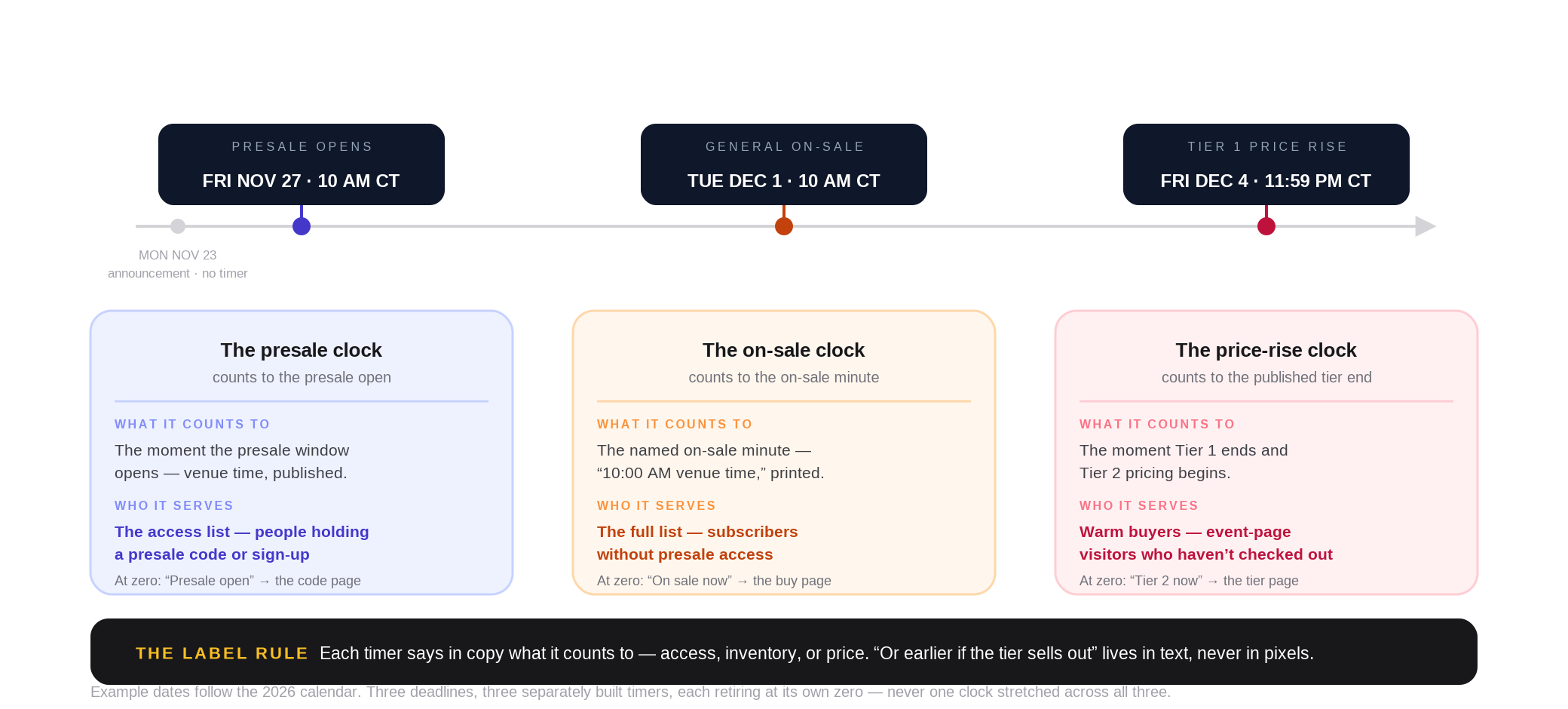
Three deadlines, three separately built timers. The event date itself is not one of them — that countdown belongs to the fans and the aggregator sites, not to your sales emails.
The presale clock — counts to the presale open
Presales exist to reward a defined group — fan-club members, past attendees, newsletter subscribers — with access before the general public; most require a sign-up or a code, which is how the major platforms define the mechanism. The presale email goes only to the people who have that access, and its timer counts to the moment their window opens.
At zero, the timer flips to its expiry state — "Presale open" — and its expiry URL routes late openers straight to the code-entry page. The clock's job is the first hour of the presale, when the best inventory and the best prices are actually available.
The on-sale clock — counts to the general on-sale minute
The general on-sale is the most precise deadline in marketing: a named minute, in a named timezone, printed on the event page. This clock goes to everyone — the full list, the one without presale access — and counts to that minute.
At zero it flips to "On sale now" and the expiry URL lands on the buy page. This is the one timer in the sequence whose expiry state is clicked at the deadline rather than after it — the same behavior webinar sequences get at go-live, covered in the webinar countdown guide.
The price-rise clock — counts to the published tier end
Early-bird and tier pricing give the third deadline: Tier 1 ends — on a published date, at a published time — and Tier 2 begins. The timer counts to the moment the price changes, and the email says so plainly: "Tier 1 pricing ends Friday at 11:59 PM." This is an offer deadline like a coupon expiry, and the mechanics of enforcing one honestly — a real end, stated in text, that the checkout actually honors — are the same ones covered in the personalized coupon guide.
At zero, the expiry frame reads "Tier 1 ended — Tier 2 pricing now", and the expiry URL points at the ticket page where the new price is already live.
Which Send Gets Which Clock?
Here's the sequence for a fictional example we'll use throughout — a summer festival announcing its June 2027 edition, with tickets going on sale across the following two weeks:
| Sent | Timer counts to | |
|---|---|---|
| Lineup announcement | Mon, Nov 23, 2026 | (no timer — see note below) |
| Presale access | Tue, Nov 24 | Presale open — Fri, Nov 27, 10:00 AM CT |
| Presale is open | Fri, Nov 27, just after 10:00 | (no countdown — "your code works now") |
| On-sale reminder | Mon, Nov 30 | General on-sale — Tue, Dec 1, 10:00 AM CT |
| On-sale morning | Tue, Dec 1, ~8:00 AM | Same clock, now reading hours |
| Price-rise warning | Wed, Dec 2 | Tier 1 ends — Fri, Dec 4, 11:59 PM CT |
| Price-rise last call | Fri, Dec 4, morning | Same clock, final hours |
Three notes on the shape of that sequence:
- The announcement email usually runs without a timer. "Lineup announced" is a reveal, not a deadline — the release-campaign rule from our teaser-clock guide applies: a clock implies a payoff minute, and an announcement email doesn't have one yet. If the on-sale date is already locked when the lineup drops, the on-sale clock can ride along — but only if it's certain enough to print.
- The two clocks in the middle overlap deliberately. Presale buyers and general buyers are different audiences getting different emails; the presale clock serves the code list through Friday morning, and the on-sale clock serves everyone else to Tuesday's minute. Neither clock is ever edited to serve the other audience — they're built separately and retire separately.
- The price-rise clock outlives both. Tiers keep rising as inventory sells, so the last clock in the sequence keeps working after the presale and on-sale timers have expired — a "Tier 2 ends Sunday" email to everyone who visited the ticket page and didn't buy.
What Makes a Price-Rise Clock Honest?
The price-rise timer is where ticketing emails most often drift into dishonesty, because real tier deadlines have a complication flash sales don't: many tiers end on a date or when the allocation sells out — whichever comes first. Organizers set this up deliberately: early-bird pricing is a ticket type with a price and a sales window, and sell-through can close the window before the calendar does.
That double condition is fine in copy and fatal in pixels. Three rules keep the clock honest:
- Put the timer only on the published date. A countdown needs a moment it can count to. "While supplies last" is not a moment.
- Say "or earlier if the tier sells out" in text, under the timer. Then the clock is a floor, not a promise — and no one who bought at Tier 1 on Friday feels misled when the tier vanished Thursday.
- No published date, no timer. If the tier's only end condition is sell-through, the scarcity is real but unclockable — state it in copy ("Tier 1 is nearly gone") and let the ticket page's own inventory display do the counting. A timer invented to decorate inventory urgency is exactly the false-urgency problem our legality guide covers, in front of an audience that will check.
The same discipline covers relabeling: a tier that has been open for three weeks has earned its "ends Friday" clock, but calling it "final hours" every week for a month is the manufacture the rules above exist to prevent. The deadline was real; the countdown should be too.
Building the Three Timers
- Build three separate timers — one per deadline. Sent emails can't be edited, so a live embed keeps counting to whatever minute it was built with, forever. The presale clock can't be repurposed into the on-sale clock on Sunday, and reusing one embed for all three deadlines guarantees at least two of your emails are counting to the wrong moment. Three timers, built separately, each retiring at its own zero.
- Set each deadline to the exact minute, in the timezone the ticketing page states. On-sales run on venue time — "10:00 AM CT" for a Chicago festival means 10:00 in Chicago, not 10:00 for each reader. The timer counts to the timezone configured with it, not each buyer's local time, so the localization settings decide whether your clock agrees with the ticketing page. Set the zone to match the venue, and state it in the email copy.
- Pick a template that reads at a glance. These emails get opened on phones, often in line at work, often forwarded to the friend who's coming along. High-contrast tiles from the 65+ templates survive forwarding best. You can build a countdown timer for your on-sale on the free plan — no credit card, no watermark on any tier.
- Make each timer clickable to its own destination. The countdown image carries a link, and each clock should send its click somewhere specific: the presale clock to the code-entry page, the on-sale clock to the buy page, the price-rise clock to the tier page. In the final hours, the timer is the biggest element in the email — don't point it at a homepage.
- Configure all three expiry states before the first send. The expiry settings control what each timer becomes at zero: "Presale open," "On sale now," "Tier 1 ended — Tier 2 pricing now," each with its own expiry URL. These flips are the payoff of the whole sequence — and the on-sale flip happens at the most-attended moment of the campaign, so it gets configured first, not last.
Honesty Rules Specific to Ticketing
- Never put a clock on the allocation. "Until sold out" has no minute. The rules above apply to every tier, every time.
- Never fake a rise. If Tier 2 costs the same as Tier 1, there is no price-rise deadline, and a countdown that implies one is fabricating the box office's decision — the one thing in ticketing nobody believes you can do.
- Announce changes before the old clock expires. If a tier date moves, or a presale window shifts, the correction goes out to everyone holding the old deadline before their timer reads zero — the same rule that governs moved release dates and moved webinar times.
- State the deadline in text in every email. Image blocking, clipped previews, and plain-text fallbacks all exist; "On sale Tuesday, Dec 1 at 10:00 AM CT" under the timer keeps the deadline alive in every rendering decision, and gives the AI-summarized inbox a text form of the deadline to carry — the rule our AI-inbox guide explains in 2026 terms.
- One clock per deadline. No second timer counting to the event date inside ticketing emails — months-out event-date clocks sell nothing and compete with the deadline clocks that do. If the door time deserves a clock anywhere, it's on the event page the week of the show, not in a presale email in November.
Subject Lines for the Sequence
The subject names the deadline; the timer shows it live.
- Presale access: Your presale code — doors open Friday at 10 AM CT
- Presale open: The presale is open — your code works now
- On-sale reminder: Tickets go on sale tomorrow at 10:00 AM CT
- On-sale morning: On sale in 2 hours — Festival 2027
- Price-rise warning: Tier 1 pricing ends Friday at midnight
- Price-rise last call: Last day at Tier 1 — prices rise tonight
Common Mistakes
- One timer stretched across three deadlines. The presale clock quietly edited into an on-sale clock leaves every delivered presale email pointing at a moment that already passed — and the buyer who saved the email screenshots the discrepancy.
- A clock on "until sold out." No published minute, no timer. Inventory scarcity lives in copy.
- Timezone drift against the venue. The ticketing page says 10:00 AM CT; the timer was built in ET and fires at 9:00 Chicago time. The most deadline-literate audience in marketing is the one most likely to notice, at the minute it matters most.
- Frozen zeros at the on-sale minute. The clock hits zero, the sale is live, and the image still reads 00:00:00:00 — no expiry state configured, at the exact moment the campaign existed to produce.
- "Final hours" as a costume. A three-week tier wearing a final-hours countdown every week. The tier's real end date will still be there after the audience stops believing the emails.
- Counting to the event date in a ticket email. A June clock inside a December email counts to the one moment in the campaign where no buyer can act. Save it for the event page.
FAQ
What should a countdown timer in an event ticket email count to?
A published ticketing deadline: the presale opening, the general on-sale minute, or the end of a priced tier. Each timer counts to exactly one of them and is labeled in copy — never the event date itself, which is months away and sells nothing.
Can I use one countdown timer for the whole ticketing sequence?
No. Presale, on-sale, and price-rise are three different moments for three different audiences, and delivered emails can't be edited — so one timer reused across all of them is guaranteed to be wrong in at least some sends. Build three timers separately.
Do countdown timers show each buyer's local time?
No. The timer counts to the timezone configured with it, not the reader's local time. On-sales run on venue time, so set the timer's zone to match the ticketing page and state the zone in the email copy.
What happens when the on-sale timer hits zero?
Whatever you configured in advance: an "On sale now" expiry frame with the expiry URL routing late openers to the buy page. Configure it before the first send — zero arrives at the most-watched moment of the whole sequence.
How do I run a countdown for a tier that ends when it sells out?
You don't — not with a timer. A countdown needs a published minute. If the tier's only end condition is sell-through, say so in copy and let the ticket page's inventory display carry it. Timers go on dates; inventory lives in text.
Where should the ticket countdown appear besides email?
On the event page, showing the same clock for the same deadline — most useful for the on-sale and price-rise clocks, where visitors from social and ads land without seeing an email. One deadline everywhere keeps the inbox and the page in agreement.
Final Thoughts
Ticketing is deadlines all the way down — access, inventory, price, each published in advance, each enforced by a box office that doesn't care what your email says. That's what makes it the best home for countdown timers since the webinar: the clock is just the schedule, rendered. Build one honest timer per deadline, set each to the venue's minute, label each in copy, and configure the flips before anything is sent. Buyers who see a ticket clock tell the truth once will open the next one first.
You can create your on-sale countdown timer in a few minutes — the same embed works in email and on the event page.
Related Guides
- Super Bowl Countdown Emails: The Watch-Party Retail Playbook
- Webinar Countdown Timer Emails: The Full Registration Sequence
- Personalized Coupon Emails with Per-Recipient Countdown Timers
- The Psychology of Scarcity: Why Countdown Timers Actually Increase Sales
- Release Countdowns: Teaser Clocks for Launches, Drops, and Premieres
- Pre-Orders, Drops, and Restocks: Countdown Emails for Scarcity Events
Last updated: November 2026. Example dates follow the 2026 calendar. Product features reflect Countdown Builder at the time of updating and can change — see the pricing page for current plans.
Written by Mehedi Hasan
Writer & Developer. He writes about email marketing, countdown timers, and campaign design.
Connect on LinkedIn