
Super Bowl Countdown Emails: The Watch-Party Retail Playbook
 By Mehedi Hasan
Short answer: a Super Bowl countdown email counts to a deadline your business can actually enforce — a party-pack pre-order close, a published order-by cutoff, or a venue's door time — and states in copy which one it is. The game itself is not one of your clocks: kickoff is the league's minute, and no subscriber can act on it through your email. One clock, one deadline, labeled.
Game week is the most deadline-native retail moment on the American calendar that isn't a holiday. Super Bowl LXI lands on the league's published schedule for Sunday, February 14, 2027 — SoFi Stadium, first ESPN broadcast, simulcast on ABC — and the week before it is when party packs get pre-ordered, shipped goods hit their real last calls, and venues fill tables for Sunday. Restaurants, smokehouses, pizzerias, merch shops, and décor stores all run game-week specials; it is one of the few national moments where a two-location barbecue joint runs the same deadline structure as a national retailer.
That makes it a natural fit for an email countdown timer — and a moment with two traps of its own. The first is honesty: the only minute everyone in the inbox is already counting to belongs to the broadcast, and none of your deadlines are it. The second is naming: the league owns the trademark, and unaffiliated businesses have spent decades advertising "the Big Game" instead. This guide maps the three clocks that are yours, the send sequence between them, the build steps, and the rules that keep the whole sequence credible.
Why Game Week Rewards Real Deadlines
- The date is fixed and public. Sunday, February 14, 2027 is on every reader's calendar months in advance — the same credibility advantage our Mother's Day playbook leans on. Nobody doubts the day exists; the only question your emails answer is which minute matters for them.
- The deadlines are yours to enforce. A pre-order close is enforced by checkout. An order-by cutoff is enforced by your fulfilment policy. A door time is enforced by whoever unlocks the front door. Game week is a rare week where a small business owns every deadline it can put a clock on.
- Last-minute buyers are built into the season. Party planning compresses hard into Thursday–Saturday of game week — the same late-purchaser pattern that makes shipping cutoffs the workhorse of the Mother's Day sequence, except here the finale is measured in hours, not days.
- The convention is understood. Subscribers know what game week is without being told. Your email doesn't have to explain the moment — just state which deadline it carries and let the timer show it live.
What Should a Super Bowl Countdown Count To?
Game week gives a retail business at least three enforceable deadlines before Sunday. They serve different customers and mean different things — inventory, delivery, and doors — and each deserves its own clock:
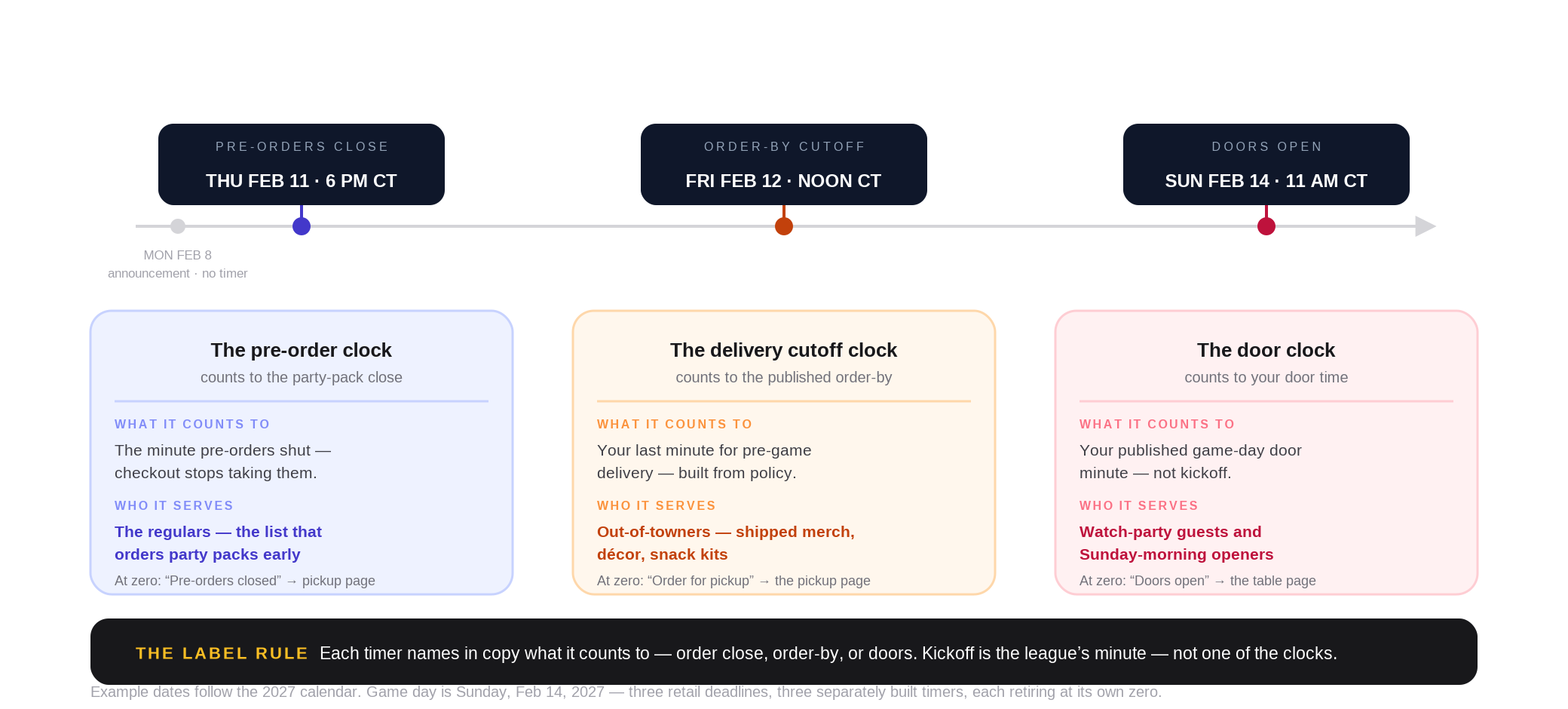
Three deadlines, three separately built timers. Kickoff is not on the list — the game's own clock belongs to the broadcast, and no one can buy anything from your email by watching it run.
The pre-order clock — counts to the party-pack close
Pre-ordering exists because game-day capacity is finite: a kitchen can smoke so many racks, a kitchen staff can plate so many party packs. The pre-order email goes to the whole list with a published close — "Party packs close Thursday at 6:00 PM" — and its timer counts to that minute. This is the same mechanics as a presale window or a made-to-order run: capacity you commit in advance, closed on a date you can print.
At zero, the timer flips to its expiry state — "Pre-orders closed" — and its expiry URL routes late openers to whatever still exists: the Sunday pickup menu, the walk-in specials, the digital gift card. The clock's job is the two days of committed cooking before the close, not the game.
The delivery cutoff clock — counts to your published order-by minute
Anything shipped — team-color merchandise, party décor, non-perishable snack kits — hits a real last call during game week: order by a published minute or it doesn't arrive before Sunday. The timer counts to the order-by moment your fulfilment can actually meet, built from your carrier's published cutoffs for your lanes and your own packing capacity — the two-clock pattern our Mother's Day guide formalizes, compressed into a single week.
At zero it flips to "Order for pickup" and the expiry URL lands on the pickup page. The email copy carries the specifics — "Order by Friday, noon CT, for delivery by Saturday" — because the promise is the policy, and the policy lives in words.
The door clock — counts to your door time
Venues running watch parties count to something no other clock in this playbook has: a minute the business itself creates. "Doors open Sunday at 11:00 AM" is published by you, enforced by you, and the one game-day countdown that sells something — tables, seats, the first hour of specials. This clock goes out Saturday and Sunday morning, counting to the door minute in the timezone your venue operates in.
At zero it flips to "Doors open — come on in", and the expiry URL points at the reservations or walk-in page. It is the game-week counterpart of the on-sale minute in the ticketing sequence: the most-attended flip of the campaign, configured first.
Which Send Gets Which Clock?
Here's the sequence for a fictional example we'll use throughout — a neighborhood smokehouse running pre-ordered party packs for Sunday pickup, shipping a small merch line, and opening its second location as a watch party:
| Sent | Timer counts to | |
|---|---|---|
| Game-week specials announcement | Mon, Feb 8, 2027 | (no timer — see note below) |
| Party-pack reminder | Wed, Feb 10 | Pre-order close — Thu, Feb 11, 6:00 PM CT |
| Pre-orders closed / ship-by warning | Thu, Feb 11, evening | Order-by cutoff — Fri, Feb 12, 12:00 PM CT |
| Last call, shipped orders | Fri, Feb 12, morning | Same clock, final hours |
| Doors open tomorrow | Sat, Feb 13 | Door time — Sun, Feb 14, 11:00 AM CT |
| Game-day morning | Sun, Feb 14, early | Same clock, counting hours |
Three notes on the shape of that sequence:
- The announcement email runs without a timer. "Game-week specials are here" is a reveal, not a deadline — the same rule our teaser-clock guide sets for launch announcements: a clock implies a payoff minute, and an announcement email doesn't have one yet. Every deadline in this campaign arrives later in the week, in the email that owns it.
- The clocks retire separately. The pre-order timer expires Thursday evening and its own expiry state does the flip — the ship-by email that follows carries a different timer, already counting to Friday noon. Delivered emails can't be edited, so the Wednesday email keeps its Thursday clock forever; building each timer separately is what keeps every send pointing at the right minute.
- The door clock is the only one counting on game day. By Sunday morning the pre-order and delivery clocks are spent and honestly so — their zeros passed, their expiry states showed it. The door clock carries Sunday alone, and it counts to your door minute, not the broadcast's.
What Can You Call the Game?
One game-week constraint no other season has: the league owns the trademark. "Super Bowl" is a registered mark, and the businesses allowed to use it in advertising are the ones that paid for the sponsorship tier that permits it — everyone else has spent decades saying "the Big Game," which is why the euphemism exists at all, as Vox documents. The same reporting covers the adjacent rules: no league or team marks in your graphics — no shield, no helmets, no team logos in your email banners.
The working convention, in practice:
- Editorial and educational uses name the event freely — news coverage, this guide, a blog post explaining the schedule. The trademark pressure lands on commercial promotion: ads and marketing emails that use the name to sell.
- Promotional sends describe the moment instead. "Game week," "the Big Game," "game day," "your Super Bowl Sunday spread" in a subject line is the convention half the restaurant industry settled on long ago — the moment survives the description.
- Time and place are always safe. "Sunday, February 14" and "watch party at our place, doors at 11" name the date and your own event without touching anyone's marks.
(General information, not legal advice — for a campaign with real budget behind it, ask an actual trademark lawyer.)
What Makes the Delivery Clock Honest?
The delivery cutoff is where game-week emails most often drift, because the real cutoff has a structure that's tempting to shortcut. Three rules keep it honest:
- Count to your own published order-by minute. The timer needs a moment it can count to, and the only defensible one is the order close your checkout actually enforces — not kickoff, not the carrier's generic "recommended by" date, and not a cutoff copied from another business's lane.
- Build the promise from sources you checked. Your carrier publishes its cutoffs; your packing capacity is your own number. Put them together before the first email, publish the result, and state it in text under the timer — "Order by Friday, noon CT, for delivery by Saturday." A deadline guessed under deadline pressure is exactly the false-urgency problem our legality guide covers, with a customer waiting on a parcel as the witness.
- Announce changes before the old clock expires. If the cutoff moves — weather, carrier notice, capacity — the correction goes to everyone holding the old minute before their timer reads zero, the same rule that governs moved release dates and moved webinar times.
Honesty Rules Specific to Game Week
- Never put a clock on kickoff. The game's minute is the league's and the broadcaster's, not yours to enforce — and unlike a door time, nothing in your email lets a subscriber act on it. The countdown-to-the-game emails that exist belong to broadcasters and leagues.
- No league or team marks in the graphics. No shield, no team logos, no helmet art in your banner or timer frame — describe colors instead ("team-color 4-pack"). The naming rules above cover why; they apply to images harder than to words.
- Skip the betting angles entirely. Squares pools, odds promos, and wager-adjacent copy are a regulatory minefield this playbook doesn't touch — game week converts fine on food, delivery, and doors.
- State the deadline in text in every email. Image blocking, clipped previews, and plain-text fallbacks all exist; "Party packs close Thursday at 6:00 PM" under the timer keeps the deadline alive in every rendering decision, and gives the AI-summarized inbox a text form of the deadline to carry — the rule our AI-inbox guide explains in 2026 terms.
- One clock per deadline. No second timer counting to Sunday kickoff inside your retail emails — the door clock is the only game-day timer, because it's the only game-day minute a customer can walk through.
Building the Three Timers
- Build three separate timers — one per deadline. Sent emails can't be edited, so a live embed keeps counting to whatever minute it was built with, forever. The pre-order clock can't be repurposed into the delivery clock on Thursday night, and reusing one embed across the week guarantees at least two of your emails are counting to the wrong moment. Three timers, built separately, each retiring at its own zero.
- Set each deadline to the exact minute, in the timezone your audience shops in. The timer counts to the timezone configured with it, not each reader's local time, so the localization settings decide whether your clock agrees with the minute printed in your copy. For a single-city business this is set-and-forget; for a chain spanning zones, build one timer per zone rather than a compromise clock.
- Pick a template that reads at a glance. Game-week emails get opened on phones, in lines, mid-errand. High-contrast tiles from the 65+ templates survive forwarding to the group chat best, and custom labels let the clock say what it counts to — "Pre-orders close in," "Order by," "Doors open in" — instead of a generic default. You can build a countdown timer for game week on the free plan — no credit card, no watermark on any tier.
- Make each timer clickable to its own destination. The countdown image carries a link, and each clock should send its click somewhere specific: the pre-order clock to the party-pack page, the delivery clock to the shipping-info or collection page, the door clock to the reservations page. In the final hours the timer is the biggest element in the email — don't point it at a homepage.
- Configure all three expiry states before the first send. The expiry settings control what each timer becomes at zero: "Pre-orders closed — pickup still open," "Order for pickup," "Doors open — come on in," each with its own expiry URL. The door-clock flip happens on the most-attended morning of the campaign, so it gets configured first, not Sunday at 10:55.
Subject Lines for the Sequence
The subject names the deadline; the timer shows it live.
- Announcement: Game week is here — Sunday specials at both locations
- Party-pack reminder: Party packs close tomorrow at 6 PM
- Pre-orders closed: Party packs are closed — Sunday pickup is still open
- Ship-by warning: Order by Friday noon to get yours before the game
- Last call: Last call for pre-game delivery — closes at noon
- Doors tomorrow: Doors open at 11 — your Sunday table is waiting
- Game-day morning: Open in 3 hours — game-day specials all day
Common Mistakes
- A countdown to kickoff. The league's minute, unenforceable by you, unservable by you — and legally tangled territory on top. Your door time does the same job and is actually yours.
- One timer stretched across the week. The pre-order clock quietly re-embedded into Friday's ship-by email leaves every earlier send pointing at a moment that already passed — and the subscriber who saved Thursday's email screenshots the discrepancy.
- A guessed carrier cutoff. "Order by Dec—" wrong month, wrong lane, wrong year: a deadline copied from memory instead of built from your carrier's published cutoffs is a fabricated one, and the customer with a Monday parcel proves it.
- League marks in the graphics. The shield, the team helmet, the team logo in the banner — the naming rules cover words; the graphics rule is stricter and simpler: none.
- Frozen zeros at the door minute. The clock hits zero at 11:00, the doors are open, and the image still reads 00:00:00:00 — no expiry state configured, at the exact moment the campaign existed to produce.
- "Final hours" as a costume. Game week is six days long, and a timer labeled "final hours" on Tuesday is wearing a costume. Each clock earns its label from how close its zero actually is.
FAQ
What should a Super Bowl countdown email count to?
A deadline your business enforces: the party-pack pre-order close, the published order-by cutoff for shipped goods, or the venue's door time on game day. Each timer counts to exactly one of them and is labeled in copy — never kickoff, which is the league's minute and sells nothing anyone can act on.
What date is Super Bowl Sunday 2027?
Sunday, February 14, 2027 — Super Bowl LXI at SoFi Stadium, broadcast on ESPN with an ABC simulcast. Game-week sends typically run Monday, February 8 through Sunday morning, with the pre-order close midweek and the delivery cutoff Friday or Saturday.
Can I put a countdown to the game itself in my emails?
No — not usefully. Kickoff is set by the league and broadcast, you can't enforce or serve it, and no subscriber can buy anything by watching it run. If game day deserves a clock in your email, it's the door clock counting to your own published opening minute.
Can I use the words "Super Bowl" in my marketing emails?
The NFL owns the trademark, and advertising use is reserved for official sponsors — which is why unaffiliated businesses have long said "the Big Game." Naming the event editorially is one thing; using the name to promote a sale is where sponsors-only usage begins. Describe the moment — game week, game day, the date — and keep league and team marks out of your graphics. General information, not legal advice.
When should I send my game-week emails?
Monday for the announcement (no timer), Wednesday for the pre-order reminder, Thursday evening when pre-orders close, Friday morning for the delivery last call, Saturday for doors-open-tomorrow, and Sunday morning for the door clock's final hours. Each deadline lives in the email that owns it.
What should the timer show after the deadline passes?
Whatever you configured in advance: an expiry frame plus an expiry URL routing late openers somewhere real — pickup menu after the pre-order close, pickup page after the cutoff, reservations page after doors open. Configure all three before the first send; the Sunday-morning flip is the most-attended moment of the sequence.
Final Thoughts
Game week rewards the businesses that own their minutes. The pre-order close, the order-by cutoff, and the door time are all yours — published, enforced, and honest in a way a countdown-to-kickoff can never be. Build one timer per deadline, set each to the minute your policy actually enforces, label each in copy, and configure the flips before Monday's announcement goes out. Customers who see a game-week clock tell the truth once will order from the next one first.
You can create your game-week countdown timer in a few minutes — the same embed works in email and on the reservations page.
Related Guides
- Event Ticket Countdown Emails: Presale, Early-Bird, and On-Sale
- Mother's Day Emails with Countdown Timers: The 2027 Playbook
- Release Countdowns: Teaser Clocks for Launches, Drops, and Premieres
- Are Fake Countdown Timers Legal? The Honest-Urgency Rules
- Last-Chance Emails: Annotated Examples + the Final-Hours Sequence
Last updated: November 2026. Example dates follow the 2027 calendar. Product features reflect Countdown Builder at the time of updating and can change — see the pricing page for current plans.
Written by Mehedi Hasan
Writer & Developer. He writes about email marketing, countdown timers, and campaign design.
Connect on LinkedIn